Windows 8 預設會自動從 Windows Update 下載安裝驅動程式,若需自行控制驅動程式版本,可關閉自動安裝功能。
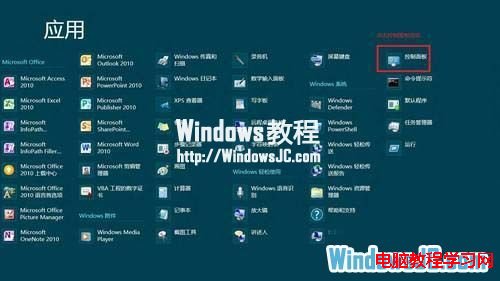
1、開始畫面右鍵空白處 →「所有應用程式」→「控制台」→ 搜尋「裝置」。
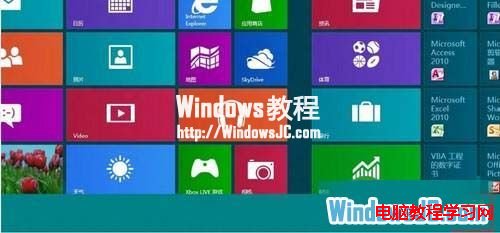
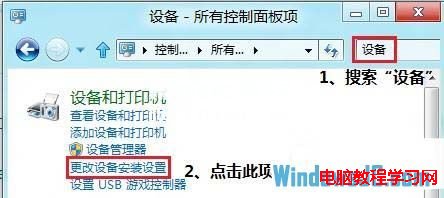
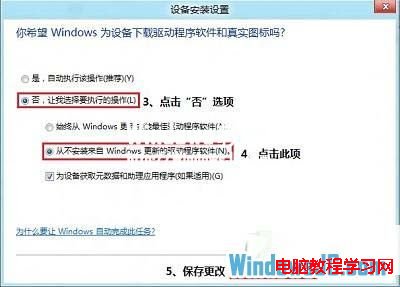
2、點選「裝置安裝設定」→ 選擇「否,讓我選擇要執行的動作」→ 勾選「永不從 Windows Update 安裝驅動程式軟體」→ 儲存變更。
Windows 8 自動修復失敗?使用系統還原解決無法開機問題
Win8 ClearType 字體微調還原教學:註冊表兩步驟重置為預設值
Win 10 開始選單 Metro 全螢幕模式如何切換?完整設定圖文教學
Win10 內建放大鏡工具路徑與啟動方式:開始選單、搜索框、檔案總管三途徑
教你不切換微軟帳戶也能用 Win10 應用商店下載應用:僅在 Store 登入微軟帳戶
美媒建議普通用戶暫緩安裝 Win10:應用崩潰頻繁、降級困難、觸控體驗不完善
Win7 硬碟安裝 Ubuntu Kylin 14.10 完整圖文教程(無需 WUBI)
Win10 RS2 預覽版 Build 14912 下周有望推送?微軟內部會議導致 14910 跳過,14912 作為補償釋出