Windows 8 螢幕保護程式或關閉螢幕喚醒時預設要求登入。若在安全環境下使用,可關閉此選項加快恢復桌面速度。
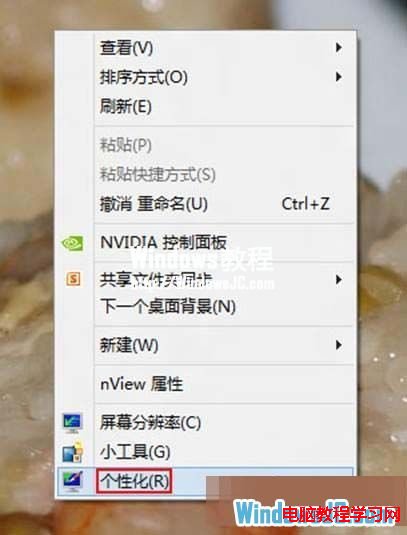
1、桌面空白處右鍵 →「個人化」。
2、右下角點選「螢幕保護程式」。

3、取消勾選「恢復時顯示登入畫面」→ 確定。
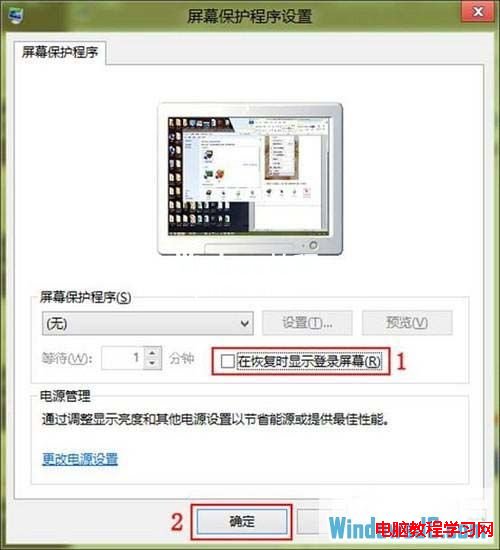
4、之後螢幕關閉或螢幕保護程式喚醒將直接進入桌面,不再要求登入。
Win7 旗艦版激活:暴風一鍵永久激活工具 + 多組 MAK 金鑰備選
Win10 Mobile 應用商店新 UI 曝光:更美觀、支援兌換碼與禮品卡,週年更新先行推送
Windows 7 刪除自建電源計畫教學:電源選項介面中切換至預設計畫後移除
Windows 9 通知中心演示:類似 WP 8.1 但不全螢幕
Windows 10 升級錯誤 C1900101-30018 完美解決方案(CMD 重設更新元件)
Win7 建立虛擬網卡後網速變慢?教你一招關閉 Large Send Offload 解決