Windows 8 瀏覽網頁影片無聲音,通常非聲卡驅動問題,而是 IE 多媒體設定被停用。檢查 IE 進階選項即可恢復。
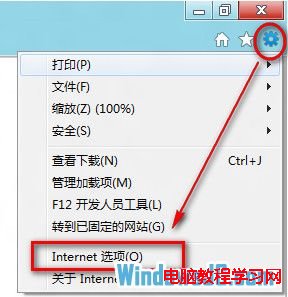
1、開啟 IE → 右上角工具圖示 →「網際網路選項」。
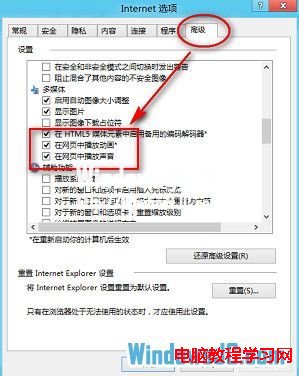
2、進階分頁 → 多媒體區段 → 勾選「在網頁中播放動畫」與「在網頁中播放聲音」→ 確定。
Windows 8 工作列位置與大小調整:解鎖拖曳移動、切換小圖示模式
Win10 UWP 版《微博》v5.3 正式版更新:圖片編輯、週邊美圖、影音體驗優化
Win8 系統藍屏錯誤代碼 0x0000009F:成因與完整解決方案
Win7 註冊 Bandicam 失敗提示「未註冊」?修改 hosts 檔案封鎖驗證伺服器 + 以管理員身分執行註冊機
Windows 10/8.1/7 全方位效能評測 (4):儲存效能 - NVMe SSD 下三系統讀寫差異極小
Windows 7 開啟檔案提示「Internet 安全性設定阻擋」兩種解決方案