Windows 8 開機後若出現「無法開啟這個應用程式」提示,通常是應用程式商店授權同步問題。連網狀態下同步授權即可解決。
1、確保已連網,開啟「應用程式商店」。
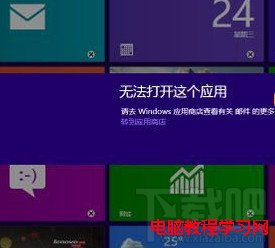
2、滑鼠移至右上角 → 設定 (齒輪圖示) → 「應用程式更新」 → 「同步授權」。
操作完成後重新開機,提示即會消失。
Windows XP 虛擬記憶體最佳設定指南:手動固定大小、精準測試法找出黃金數值
Win10 TH2 正式版 ISO 鏡像安裝方法大全:升級、全新、雙系統一網打盡
Win7/Win8.1 雙系統預設開機項目修改教學(msconfig 指令法)
Windows 10 設定回饋與診斷頻率/資料收集等級教學:保護隱私自主選擇
Windows 8 內建虛擬光碟機使用教學:雙擊 ISO 掛載、右鍵彈出超簡單
Win8.1 升級 Win10 出現 0x80070003 錯誤?停用 Windows Update 服務並刪除軟體分發資料夾內容解決