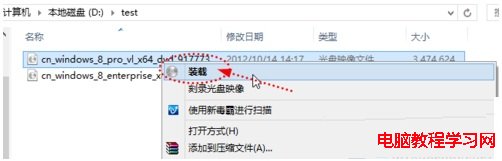
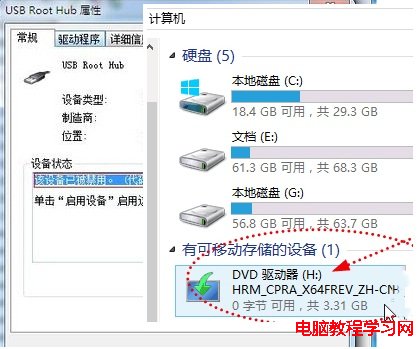
Win8 系統整合虛擬光碟機功能,無需第三方軟體即可掛載 ISO 檔案。
虛擬光碟機右鍵 → 選擇 「彈出」 即可卸載。
兩個步驟搞定,Win8 內建虛擬光碟機方便又快速。
Windows 10 更新錯誤 0x8024402f 完整解決方案:重置更新服務與註冊表
Win10 週年更新 KB3201845 補丁更新內容大全(官方完整日誌)
Windows 10 正式版基本定型 進入問題修復階段 RTM 六月完成
Win7 收訊息/聽音樂時音量自動變小?聲音控制台「通訊」頁籤選「不執行任何動作」即可關閉
Windows 10 技術預覽版能否升級正式版?需獨立授權金鑰,預計明年下半年釋出
Windows 7 取消無線網路自動連線:單一網路或批次管理已儲存設定檔
Win8 開始畫面 IE 磚無法開啟 勾選「IE 磚用於開啟桌面版 IE」解決
Win10 預覽版 14257 已知問題匯總:嚴禁使用「重置此電腦」,否則須重裝系統