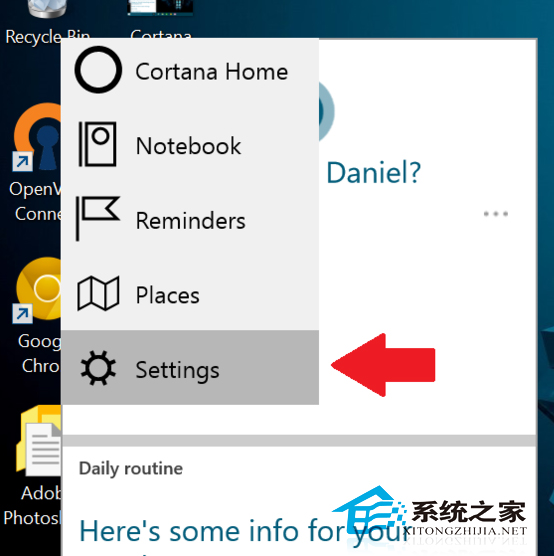
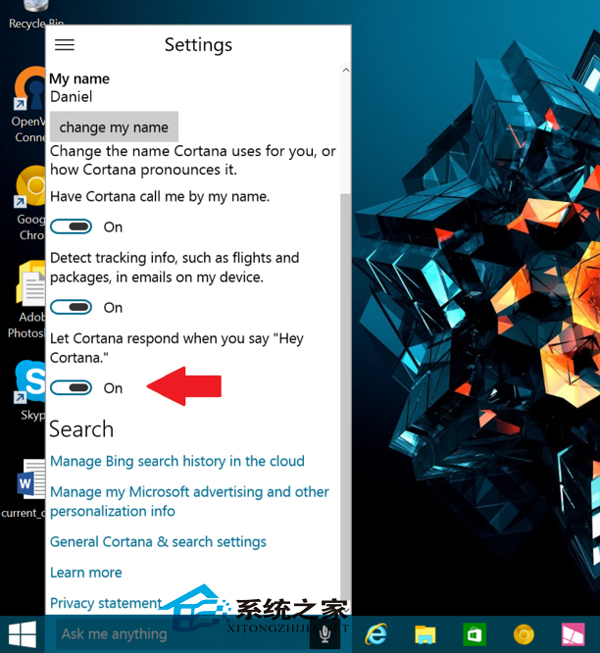
Win10 Build 9926 內建 Cortana (小娜) 語音助理,提供兩種啟動方式:
語音需標準發音,不便時改用快捷鍵。新手可參考 Win10 9901 Cortana 使用教學。
Win8 無線網路「受限」解決法:關閉網卡省電模式
微軟官方 Win 10 正式版發布專題部落格上線
Win9 技術預覽版內部版本號升級至 9844,今晚舊金山正式發布
Win8/8.1 安裝驅動程式提示「資料無效」?啟動 Device Install Service 與 DsmSvc 服務完美解決
WinXP 開機提示「無法找到組件」解決方案:DLL 缺失修復與系統檔案還原雙軌制
Win10 快速切換桌面兩大絕招:任務列按鈕與 Win+D 快捷鍵
Windows 建立隱藏系統帳號 登錄覆蓋 SAM 資料庫技巧
Win10 Mobile 14342.1003 更新體驗:穩定性提升、Edge 手勢回歸