Windows 7 建立寬頻連線 (PPPoE) 步驟與 XP 不同,透過「網路和共用中心」即可快速完成並建立桌面捷徑。
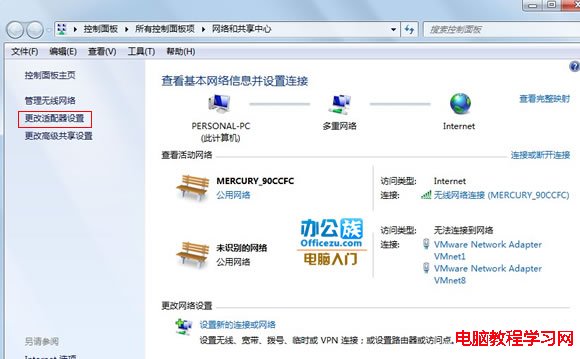
1、開啟「控制台」→「網路和網際網路」→「網路和共用中心」,或右鍵工作列網路圖示選擇「開啟網路和共用中心」。
2、點選左上角「變更介面卡設定」,查看所有網路連線。
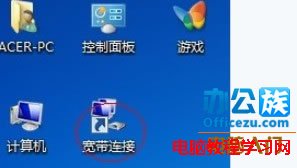
3、右鍵點選「寬頻連線」→「建立捷徑」,系統提示無法在這裡建立,選擇「是」在桌面建立捷徑。
免費全能截圖工具 PicPick 4.0.7 釋出:強化 Win10 支援、修正白板形狀、多國語言版含簡中
Windows 7 任務列右下角「操作中心」圖示隱藏/關閉教學
Windows 8 管理無線網路連線完整指南
Win10 新增 Windows Hello 生物識別功能 支援臉部、虹膜、指紋登入
Win10 滑鼠操作延遲怎麼辦?關閉 Xbox 應用程式 Game DVR 功能即可解決
Windows 8.1 升級 Windows 10 技術預覽版 9841 顯示未啟用 錯誤 0xc004fc03 解決方案:重置網路元件與元件存儲修復
Win8.1 系統怎麼查看硬盤大小?Win8.1 查看硬盤容量的方法
Win10 Mobile 準正式版 10586.11 修復內容與已知問題完整彙總