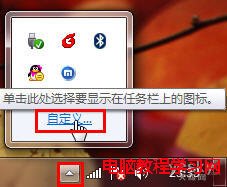
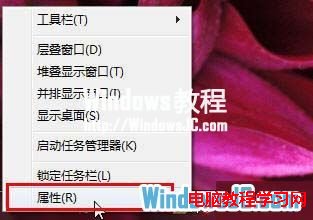
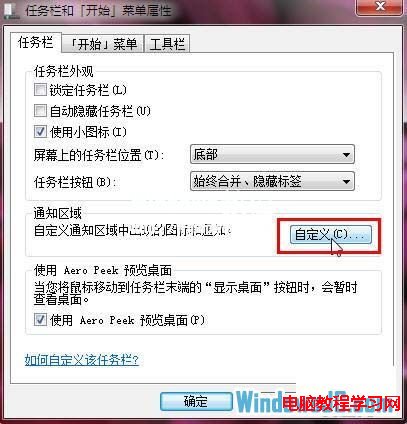
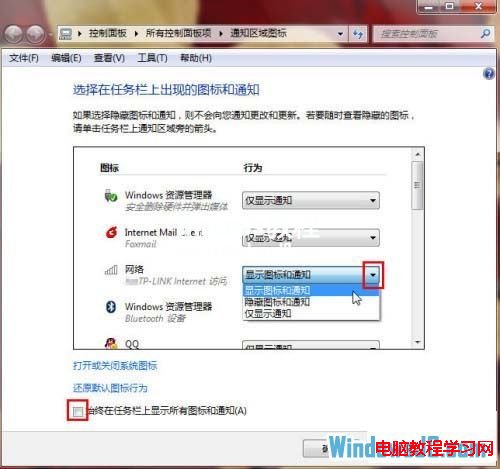
新筆電預裝 Windows 7 時,任務列通知區域可能隱藏部分程式圖示。點擊任務列右側三角形按鈕可暫時顯示隱藏圖示;長期設定請進入任務列屬性自訂。
靈活運用可打造專屬的無干擾工作環境。
Win8.1 安全中心服務啟動失敗錯誤 1068?啟動相依服務 RPC 與 WMI 即可修復
Win10 設定遠端協助僅允許 Vista 以上版本連線
Win8.1 如何升級 Win10?透過 Windows Update 線上升級完整圖文教學
Win7 提升顯卡效能三大支柱:正確驅動、散熱優化、供電穩定
Win10 通知彈出位置從右上角移至右下角,登錄表修改教學
Windows 7 任務管理員無法結束程序?用指令強制終結進程
Win7查看Windows記錄檔完整教學:事件檢視器五大類別與清理建議
U 盤/光碟啟動 WINPE 製作完整圖解:老毛桃 U 盤版 + 深山紅葉光碟版