Windows XP Windows 7 Windows 2003 Windows Vista Windows 綜合教學 Linux 系統教學
Windows 10 Windows 8 Windows 2008 Windows NT Windows Server 電腦軟體教學
您现在的位置: Windows教程網 >> Windows教程 >  >> Windows 綜合教學 >> 關於 Windows

Windows 7 輕鬆建立 VHD 虛擬硬碟:磁碟管理內建功能無需第三方工具

編輯:關於 Windows

Windows 7 內建 VHD(虛擬硬碟)建立與掛載功能,可作為加密資料容器或測試環境。透過「磁碟管理」即可完成建立、初始化、分區全流程。

操作步驟

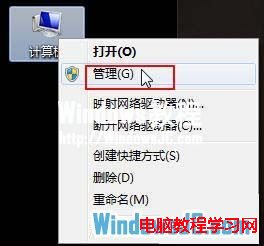
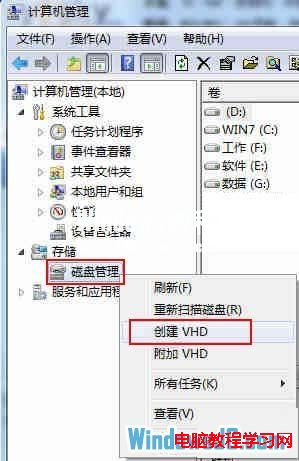
  1. 右鍵「電腦」→「管理」→「磁碟管理」→ 右鍵空白處 →「建立 VHD」。
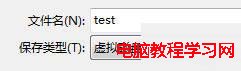
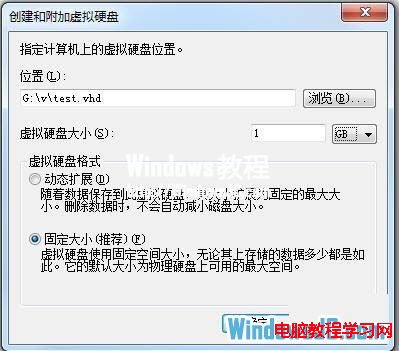
  2. 指定儲存路徑、大小(依可用空間與需求)、格式預設 VHD、固定大小或動態擴充均可。
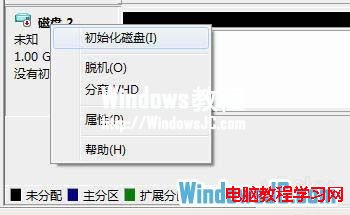
  3. 建立完成後,右鍵新磁碟 →「初始化磁碟」 → 右鍵未配置空間 →「新增簡單磁碟區」 → 依精靈完成分區格式化。
VHD 掛載後如同實體硬碟,可儲存機密檔案、安裝作業系統或作為備份容器,極具彈性。

Copyright © Windows教程網 All Rights Reserved