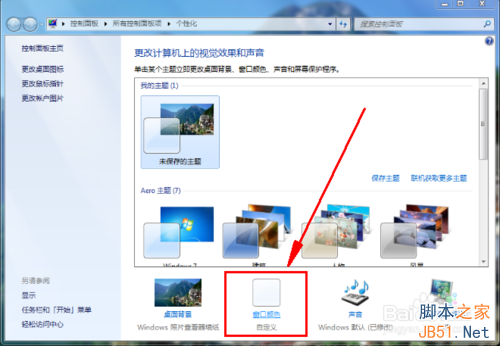
在 Windows 7 建立新程式庫時,若出現「無法建立檔案 '新建 程式庫.library-ms' 檔案系統錯誤 (16389)」,通常是群組原則限制了使用者在使用者設定檔根目錄建立檔案。透過修改群組原則即可解除限制。
gpedit.msc 開啟本機群組原則編輯器。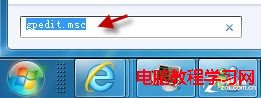
使用者設定 → 系統管理範本 → Windows 元件 → Windows 檔案總管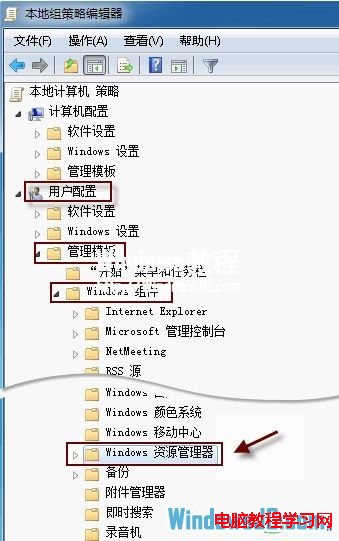
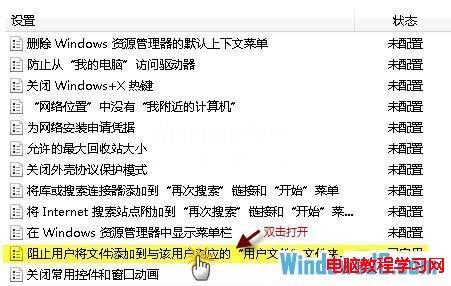
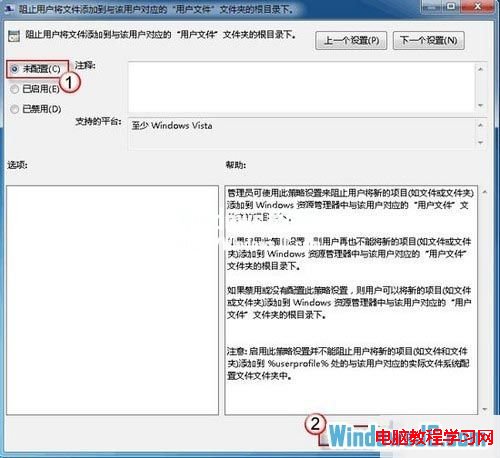
此原則預設多為「未設定」,若被第三方優化軟體或企業環境誤啟用,會導致程式庫功能失效。修正後功能即刻恢復正常。
Win7 筆電搜尋 Wi-Fi 出現亂碼無法連線?修改路由器 SSID 為英數即可
Win7 桌面「電腦」「回收站」圖示被刪除怎麼恢復?個人化設定勾選即可找回
Win10 聲卡、無線網卡驅動異常?手動選擇內建驅動解決衝突
Win10 Mobile 10536 预览版越用越卡?微软确认性能回归正在修复,新版本评估中
Win8.1 Windows Update 錯誤 8024402F 解決方案四則:重試、清理快取、變更 DNS、重啟服務
Win 10 執行 Qt 程式提示「找不到 mingwm10.dll」?兩種解法:複製 DLL 或加入環境變數
Win10 移除右鍵選單「Radeon 設定」選項 (AMD 顯卡)
Win10 觸控版 Office 無法開啟:ClipSVC 授權快取殘留導致,批次檔備份/還原 tokens.dat 徹底修復