Qt4 開發者在 Win 10 執行編譯後的 .exe 遇到 mingwm10.dll 遺失錯誤,解決方法:
將編譯產生的 .exe 複製至 Qt 安裝目錄 \bin 下 (含 QtCore4.dll、QtGui4.dll、mingwm10.dll) 即可直接執行。
Path,新增 Qt 安裝路徑下的 mingw\bin 與 qt\bin (例:C:\Qt\2009.04\mingw\bin;C:\Qt\2009.04\qt\bin)。.exe 即可執行。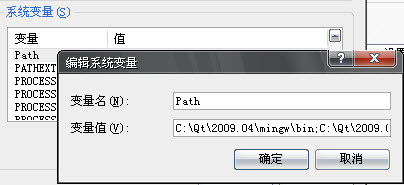
注意:路徑順序影響載入,若出現「無法定位程序輸入點」錯誤請調整順序;若仍缺 DLL 諜繼續補齊路徑。
Win7 自動更新失敗無法進入系統?兩種修復方案(安全模式/系統還原)
Windows 10 UserManager 服務重開機後自動停用導致開始功能表/Cortana 失效,用排程器跑批次檔永久修復
進程管理器中 chrome.exe *32 是什麼意思?代表 32 位元程序非 32 個進程
Win10 TH2 多瀏覽器分頁無響應/卡死?三法修復:IE 啟用 ActiveX 篩選 / 禁用 Shockwave Flash Object / 完整重裝 Flash
Win10 提示 mfc100u.dll 載入失敗?QQ 電腦管家「電腦診所」一鍵修復缺失 DLL
Windows 7 AppLocker 禁止特定程式執行:防止小孩沉迷遊戲、保護隱私軟體