Windows XP Windows 7 Windows 2003 Windows Vista Windows 綜合教學 Linux 系統教學
Windows 10 Windows 8 Windows 2008 Windows NT Windows Server 電腦軟體教學
您现在的位置: Windows教程網 >> Windows教程 >  >> Windows 綜合教學 >> 關於 Windows

修改 Windows 8 開始畫面磚列數:登錄編輯器自訂最大列數

編輯:關於 Windows

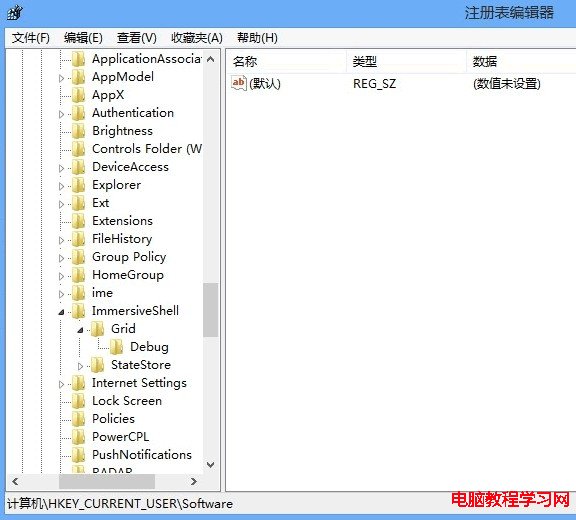
Windows 8 開始畫面磚列數預設依螢幕解析度高度自動決定(768p 為 4 列、1080p 為 6 列)。若想自訂列數,可修改登錄:Win+R regedit → 定位 HKEY_CURRENT_USER\Software\Microsoft\Windows\CurrentVersion\ImmersiveShell\Grid → 新建 DWORD (32-bit) 值 Layout_MaximumRowCount → 設定十進制數值(如 2、3、5 等) → 登出/重開機生效。注意:非預設列數可能導致磚顯示擁擠或留白,請謹慎調整。

操作步驟

  1. Win+R 輸入 regedit 開啟登錄編輯器。
  2. 定位 HKEY_CURRENT_USER\Software\Microsoft\Windows\CurrentVersion\ImmersiveShell\Grid。
  3. 登錄路徑 Grid
  4. 右鍵空白處 → 新建 → DWORD (32-bit) 值 → 命名 Layout_MaximumRowCount。
  5. 新建 Layout_MaximumRowCount
  6. 雙擊修改數值資料 → 選擇「十進制」 → 輸入欲顯示列數(如 2) → 確定。
  7. 設定列數數值
  8. 登出或重開機,開始畫面磚列數即依設定顯示。

參考值

  • 1366x768 螢幕預設 4 列,可改 2~5 列。
  • 1920x1080 螢幕預設 6 列,可改 3~7 列。
  • 過多列數會導致磚縮小難以點選,過少則浪費螢幕空間。
Copyright © Windows教程網 All Rights Reserved