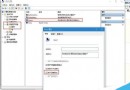
Windows 檔名不可為空,但可用不可見字元偽裝「無檔名」:
同一目錄建立多個「無檔名」項目:重複步驟 2,每次多輸入一組 Alt+0160 (兩個不可見字元、三個…),系統視為不同檔名。
應用:特殊排序需求、隱藏特定捷徑、惡作劇等。注意:命令列 dir 仍可見,非真正隱藏屬性。
dir
Windows 7 複製資料夾完整路徑技巧:Shift+右鍵「複製為路徑」
Win7 耳機有雜音/電流聲?關閉「麥克風增益」與「麥克風加強」即可消除
Windows XP 修改登錄偽裝為 POSReady 2009 繼續接收安全更新至 2019 年
WPS Office 文件新增自訂版權聲明/浮水印教學:文字方塊與物件格式設定
Windows 7 任務列縮圖預覽消失?群組原則啟用「關閉任務列縮圖」設為已停用
Win10 企業版 90 天免費評估版釋出:一般用戶不建議安裝,缺少 Cortana、商店等核心功能
Win7 關閉安全警示(防火牆/安全中心)完整圖文教學
Windows 8 開始畫面新增系統管理工具磚:一鍵存取磁碟清理、系統設定等神器