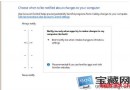
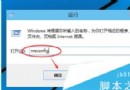
Win8/8.1 同樣可用 netplwiz 設定自動登入。步驟:Win+R 輸入 netplwiz → 取消勾選「使用者必須輸入使用者名稱和密碼」→ 套用 → 輸入目前帳號密碼確認 → 確定。重開機即可免輸入密碼直達桌面。
netplwiz
Windows 8.1 Update 3 (11 月更新) 內容總覽:安全性強化、硬體支援擴充、開始選單仍缺席
Win10 開機慢?啟動速度優化完整教學(快速啟動+進階設定)
Win8.1 開啟工作管理器三種快速方法
Win7 IE 瀏覽器重置完整操作步驟:解決故障恢復預設
Win10 開機自動啟動程式設定完整教學:啟動資料夾位置與工作管理員管理
Win10 正式版無法安裝字體、防火牆啟動失敗怎麼辦?三種解決方案完整教學
Windows 10 安裝 Realtek 音效驅動程式逾時導致無聲音?調整裝置安裝逾時上限解決
Win10 更換主題圖文教程:個人化 → 主題 → 內建/商店下載/自訂主題全流程