Windows 10 Insider Preview 安裝 Realtek 高解析音效驅動程式時常因預設逾時過短(預設 60 秒)導致安裝中斷,造成無聲音、麥克風無法使用。透過群組原則延長逾時時間可解決。
gpedit.msc。1800(30 分鐘)→ 確定。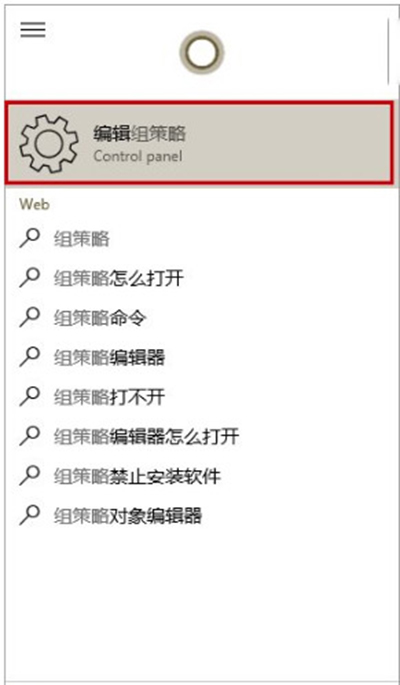
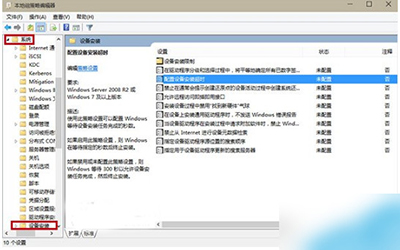
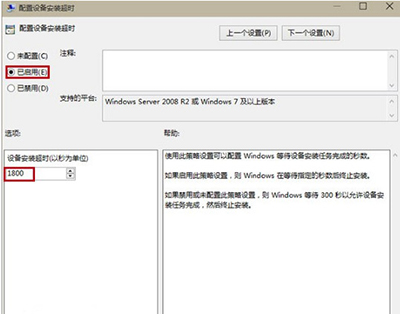
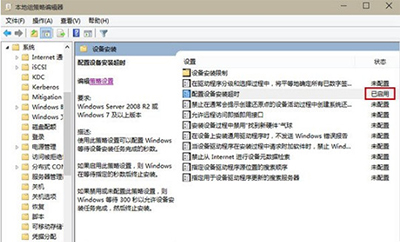
說明: Realtek 驅動程式安裝包含多個子元件(音效控制台、麥克風增強、音效特效等),預覽版驅動簽名驗證較慢,延長逾時上限可確保完整安裝。正式版驅動通常不會遇到此問題。
Windows 8.1 變更預設輸入法教學:以智能陳橋五筆為例取代微軟拼音
Win8/Win10 連接 XP 共享印表機找不到驅動?在 XP 端安裝 64 位驅動即可解決
雙系統環境下移除 Windows 8.1 保留 Windows 7 完整步驟
True Launch Bar:強化 Windows 快速啟動欄,支援分組、自訂圖示與拖放管理
申請 Microsoft 帳號完整教學:為 Windows 10 安裝做準備
Windows Server 2003 今年 7 月停止支援,微軟呼籲遷移至 Server 2012 R2/Azure/Office 365
Windows 10 Build 10134 即將發布,微軟測試負責人透露:專注修復與優化,Fast Ring 將優先獲得