Windows 8 應用商店報錯 `0x80240437`,通常因 Windows Update 組件緩存 (`SoftwareDistribution`) 損壞導致。通過停止服務、重命名緩存目錄、重啟服務可快速修復。
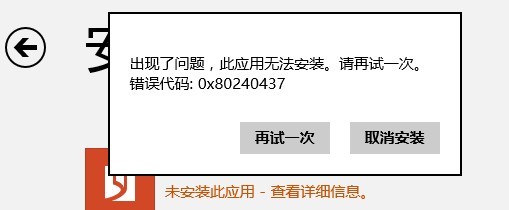
`SoftwareDistribution` 存儲 Windows Update/應用商店下載的更新元數據、臨時文件。該目錄損壞/鎖定/權限異常會導致更新檢查/下載失敗,報錯 `0x80240437`。重命名強制重建可清除損壞狀態。
net stop wuauserv
net stop bits
ren C:\Windows\SoftwareDistribution SoftwareDistributionOld
net start wuauserv
net start bits
重置軟件分發目錄是解決 Win8/8.1/10 更新/商店類錯誤的通用核心方案,成功率極高。
惠普 Win8 筆電建立「儲存空間」 (Storage Spaces) 教學:整合多顆硬碟提升資料保護
Windows 8 解決無法辨識 USB 裝置:重啟 Plug and Play 服務與重裝驅動
Win8 使用 SFC /scannow 修復系統文件完整指南
Win8 IE 網頁無法正常顯示?三招修復:關閉增強保護模式、相容性檢視加入網址、netsh winsock 重置
Windows 8 使用習慣調整:刪除檔案確認提示、移除舊版 Windows 安裝檔釋放空間
Windows 8.1 預覽版升級安裝完整教學 (雙管道:應用商店 / ISO)