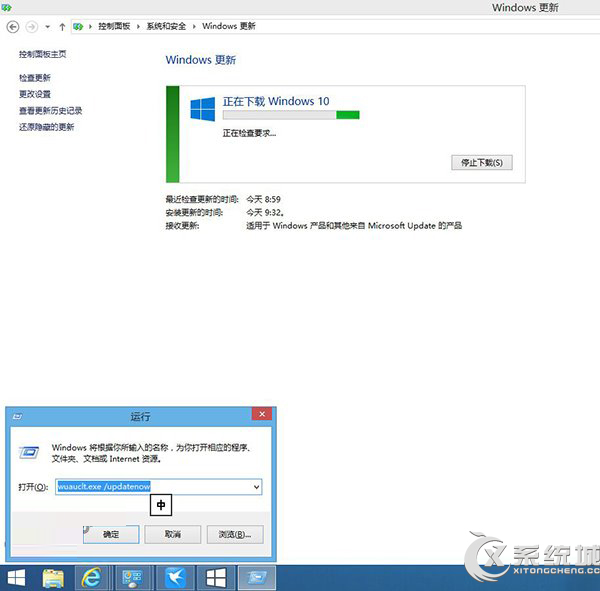
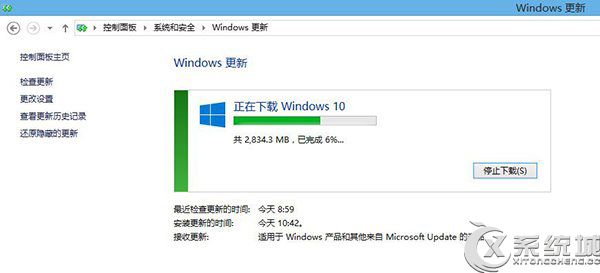
Windows 8.1 若未收到 Windows 10 免費升級推送,可透過清除更新快取並執行指令強制檢查更新,加速取得升級資格。
C:\Windows\SoftwareDistribution\Download
wuauclt.exe /updatenow
exe
/
此法可強制觸發升級檢查,適用於未自動收到推送的裝置。
Win8.1 查詢授權類型:slmgr 指令判斷永久啟動或試用版
Windows 8 啟用 BitLocker 磁碟加密完整教學:控制台設定密碼、備份金鑰、啟動加密
Win8 系統還原在哪?四種開啟方式快速找到
Win8 格式化 C 槽後果:系統消失需重灌,線上環境無法操作
Win8 寬頻連線錯誤 769:網卡停用或失效,啟用網卡即可解決
Win8 禁用 IE10 關閉多個分頁警告:網際網路選項取消勾選關閉警告
Windows 8 實現共享上網(ICS)完整設定教學:閘道電腦與用戶端設定
Win8 開機提示「你的電腦出現問題需要重新啟動」 循環重啟修復方案