安裝 Office 2013 後,SkyDrive Pro 2013 右鍵選單變灰無法點選。需修改登錄表移除 CommandStateHandler 鍵值以激活主選單與子選項。
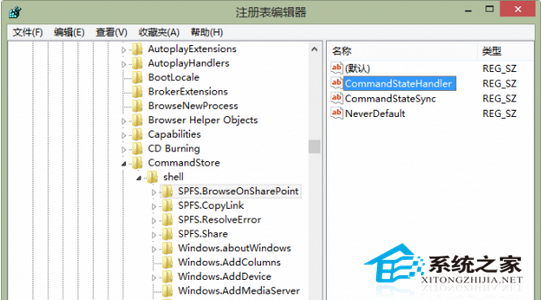
regedit,定位 HKEY_CLASSES_ROOT\AllFilesystemObjects\shell\SPFS.ContextMenu,右側雙擊 CommandStateHandler 清空數值資料。HKEY_LOCAL_MACHINE\SOFTWARE\Microsoft\Windows\CurrentVersion\Explorer\CommandStore\shell\,找到 SPFS. 開頭的 4 個金鑰,逐一清空其 CommandStateHandler 數值。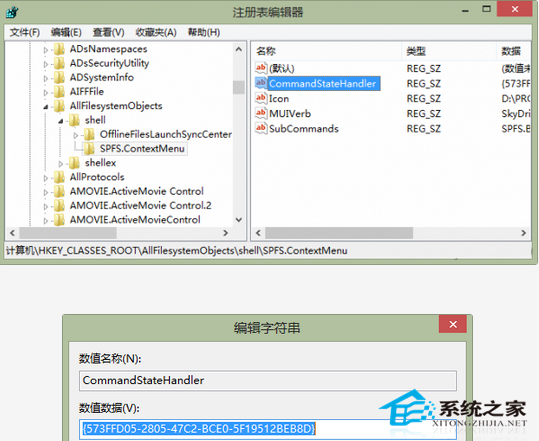
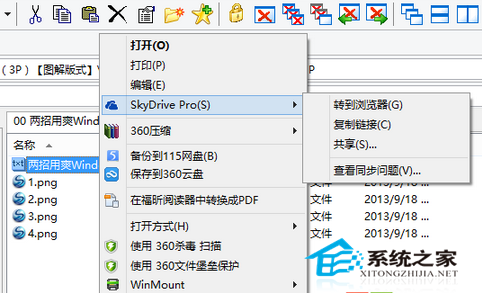
修復後可使用「共用」、「複製連結」等 SkyDrive Pro 協作功能,提升團隊效率。