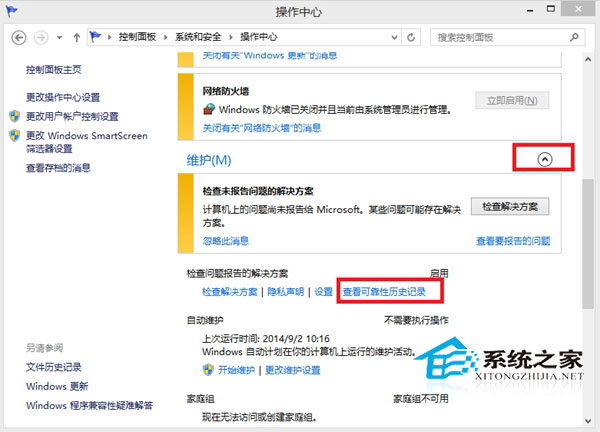
Windows “可靠性监视器”记录系统稳定性指数及应用/硬件/Windows 失败事件。该功能无法关闭,但可清空历史报告。清除后稳定性指数重置为 10,历史时间线归零。
功能源自 Vista,主要供 IT 运维分析崩溃趋势。普通用户无需关注,若介意界面“红叉”可按上述清空。Windows 10/11 路径:设置 → 系统 → 疑难解答 → 其他疑难解答 → 可靠性监视器 → 查看问题报告 → 清除。
Win8.1 Update 更新後黑屏?顯卡驅動衝突與帳號損壞雙重排查方案
Win8 遠端桌面被防火牆封鎖:高級安全性 Windows 防火牆啟用遠端桌面規則
Windows 8 關機方法大全:六種快速關機技巧
Win8 語音辨識功能完整教學:啟用、基本指令、滑鼠網格拖曳操作
U 碟安裝 Win8 完整流程:準備工作、啟動碟製作、BIOS 設定、安裝實戰
Win8 個人化設定三步驟:鎖定畫面、開始畫面背景、使用者大頭貼
Windows 8 常用執行指令大全 108 個:從 appwiz.cpl 到 wuapp 完整對照表
Win8.1 繞過資源回收筒直接刪除檔案:Shift+Delete 或 設定永久刪除