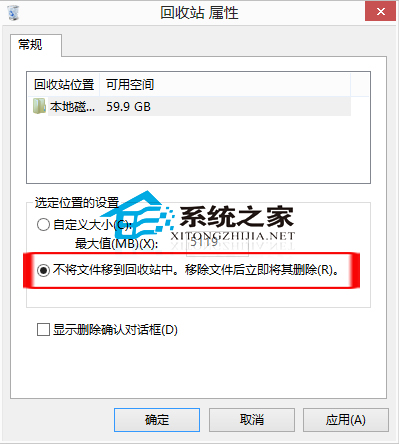
Windows 8.1 提供兩種方式直接永久刪除檔案,不經資源回收筒:
選取檔案 → 按 Shift+Delete → 確認刪除。檔案直接永久移除,不進回收筒。
提醒:永久刪除無法透過回收筒還原,請謹慎使用。若清空回收筒無聲音提示,可在「聲音」設定中為「清空資源回收筒」事件指定聲音。
Win8.1 C 槽空間暴增?4 招清理 Windows.old、暫存檔、虛擬記憶體、還原點釋放空間
Windows 8 開機直接進入桌面跳過 Metro:建立 .scf 腳本配合任務排程器登入觸發
Win8 更換開始畫面背景顏色與紋理:個人化設定 9 色 6 紋任選
Windows 8 透過登錄檔設定開機自動開啟數字鍵盤 NumLock
如何製作 Windows 8.1 Update 版 WinPE 5.1 微型系統
Win8/8.1 開啟裝置管理員兩步驟快速教學
Win8 磁碟機無法重新命名?顯示隱藏系統檔案並解除鎖定刪除殘留資料夾(重複內容)
Win8 系統使用教學:從找回開始選單到關機、介面切換完整指南