Windows XP Windows 7 Windows 2003 Windows Vista Windows 綜合教學 Linux 系統教學
Windows 10 Windows 8 Windows 2008 Windows NT Windows Server 電腦軟體教學

Windows 8 透過登錄檔設定開機自動開啟數字鍵盤 NumLock

編輯:Win8 系統應用技巧

Windows 8 開機預設不開啟數字鍵盤,財務/數據輸入人員需每次手動按 NumLock。修改登錄檔 InitialKeyboardIndicators 值為 2,可實現開機自動啟用數字鍵盤,一勞永逸。

設定步驟

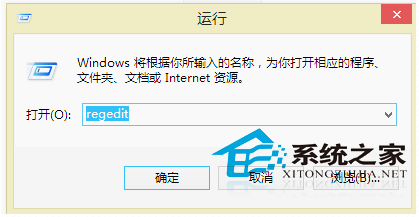
  1. Win + R → regedit 開啟登錄編輯器
  2. 依序展開:
    HKEY_USERS\.DEFAULT\Control Panel\Keyboard
  3. 雙擊右側 InitialKeyboardIndicators → 數值資料改為 2 → 確定
  4. 重新開機生效

登錄檔路徑 InitialKeyboardIndicators

數值對照表

數值效果
0關閉所有鎖定鍵(NumLock、CapsLock、ScrollLock)
1開啟 CapsLock
2開啟 NumLock (建議值)
3開啟 CapsLock + NumLock

補充說明

  • 此設定影響「預設使用者」配置,對新建帳戶、登入畫面、系統啟動階段均生效
  • BIOS/UEFI 設定中若有「Boot Up NumLock Status」請同步設為 Enabled,硬體+軟體雙重保障
  • Windows 10/11 同樣適用此登錄檔路徑與數值
Copyright © Windows教程網 All Rights Reserved