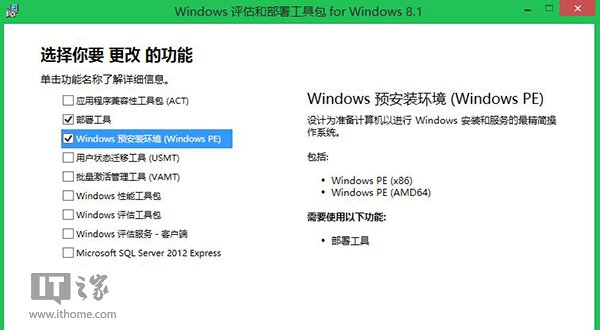
C:\MSU。copype amd64 C:\WinPE_amd64
Dism /Mount-Image /ImageFile:"C:\WinPE_amd64\media\sources\boot.wim" /index:1 /MountDir:"C:\WinPE_amd64\mount"
Dism /Add-Package /PackagePath:C:\MSU\Windows8.1-KB2919442-x64.msu /Image:C:\WinPE_amd64\mount /LogPath:AddPackage.log
Dism /Add-Package /PackagePath:C:\MSU\Windows8.1-KB2919355-x64.msu /Image:C:\WinPE_amd64\mount /LogPath:AddPackage.log
Dism /Add-Package /PackagePath:C:\MSU\Windows8.1-KB2932046-x64.msu /Image:C:\WinPE_amd64\mount /LogPath:AddPackage.log
Dism /image:C:\WinPE_amd64\mount /Cleanup-Image /StartComponentCleanup /ResetBase
Dism /Unmount-Image /MountDir:"C:\WinPE_amd64\mount" /commit
Dism /Export-Image /SourceImageFile:C:\WinPE_amd64\media\sources\boot.wim /SourceIndex:1 /DestinationImageFile:C:\WinPE_amd64\media\sources\boot2.wim
del C:\WinPE_amd64\media\sources\boot.wim
ren C:\WinPE_amd64\media\sources\boot2.wim boot.wim
MakeWinPEMedia /ISO C:\WinPE_amd64 C:\WinPE_amd64\WinPE_amd64.iso
完成後可啟動 WinPE 5.1,支援 WIMBoot 等新功能。
Win8 提示無效金鑰錯誤 0x80070424?匯入登錄重建 Software Protection 服務修復授權
Windows 8 修復命令提示字元 DOS 指令失效:環境變數 Path 修正
Win8.1 安裝 3 月更新後頻繁假死?微軟確認輸入法相衝突,暫時卸載輸入法或移除 KB3033889 修補程式
Windows 8.1 降級回 Windows 8 兩種方法:系統還原與 Ghost 重裝
Windows 8 鍵盤捷徑大全:Win 鍵、滑鼠操作與特殊組合鍵完整表
Windows 8 新增虛擬網路介面卡 (Microsoft KM-TEST Loopback Adapter) 完整圖文教學 (重複內容整合版)