Windows 8.1 內建「事件檢視器」記錄系統啟動、關機、錯誤、應用程式執行等詳細日誌,可匯出分析家人使用狀況。
操作步驟
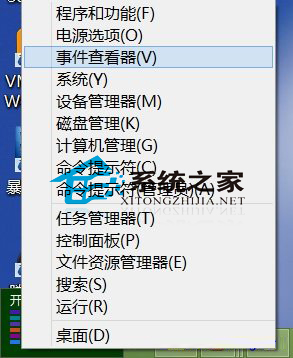
- 滑鼠移至螢幕右下角 → 右鍵點擊開始縮圖(或 Win8.1 直接右鍵開始按鈕)→ 選擇「事件檢視器」。
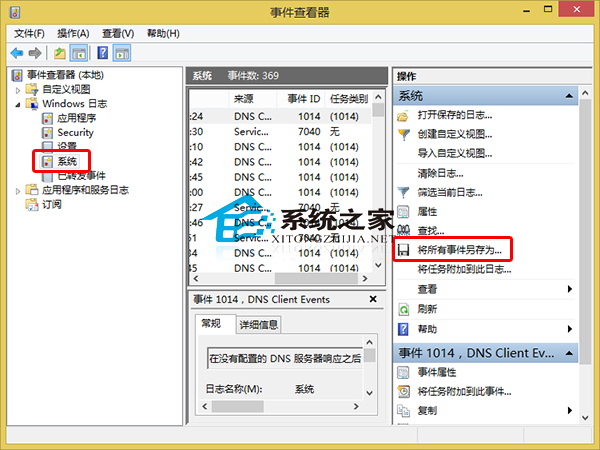
- 左側展開「Windows 記錄」→ 選擇「系統」(或「應用程式」、「安全性」)。
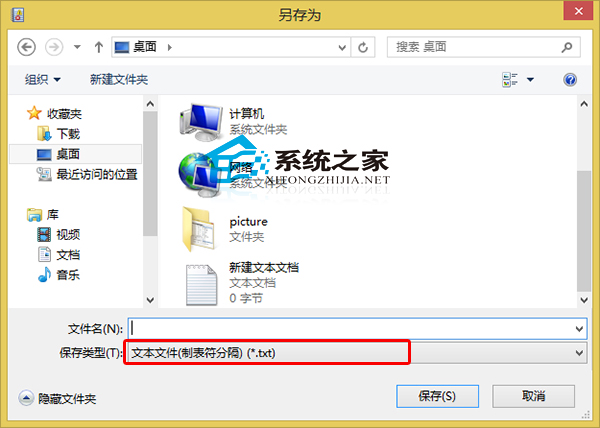
- 右側動作面板點擊「儲存所有事件為」→ 檔案類型選
.txt → 命名、選擇儲存位置 → 「儲存」。
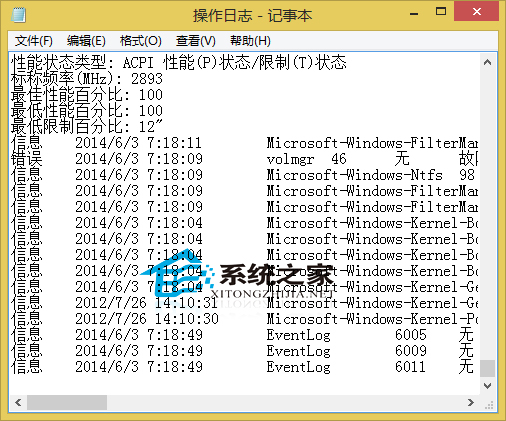
- 用記事本開啟匯出的文字檔,即可看到自安裝以來的所有系統操作記錄。
替代工具:第三方軟體 ManicTime 提供圖形化時間軸、應用程式使用統計、自動標記專案,更適合生產力分析。