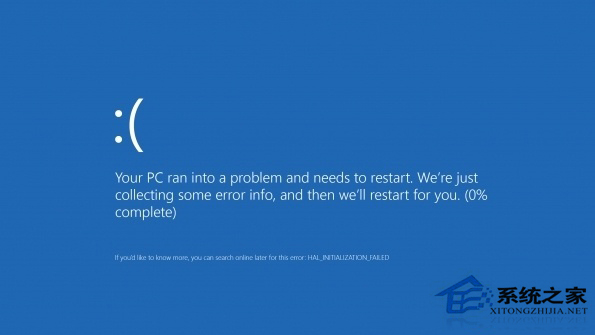
Windows 8 安裝特定更新後大面積藍屏,微軟確認 KB2982791 含 Bug 並已撤回。解除安裝 KB2982791、KB2970228、KB2975719、KB2975331 等問題補丁可解決藍屏。
KB2982791
KB2970228
KB2975719
KB2975331
微軟自 2014 年 8 月起將固定「週二修補日」更名為「週二更新」,不僅修補安全漏洞亦可能新增功能,更新頻率更高。遇到更新後藍屏優先檢查近期安裝補丁並嘗試移除。
Win8/8.1 安裝 Win10 雙系統完整圖文教學(UEFI/GPT 支援)
Win8.1 安裝後硬碟變成「可攜式裝置」?更新 Intel SATA AHCI 控制器驅動程式修復
Win8.1 無法登入 Xbox 錯誤 0xc00d11cd?啟用核心身分驗證服務修復連線
Win8 七大頂級使用技巧:關閉提示音、解除檔案占用、禁用 UAC、找回開始選單、禁用 Modern UI、禁用鎖定畫面、系統優化
Win8 系統以窗口模式查看圖片教程:告別全屏 Modern 應用
Win8 登錄檔備份完整教學:匯出與匯入.reg 檔案
Win8 設定是否顯示最近使用的檔案與程式,保護隱私
Win8 筆記本螢幕亮度無法調節?修改登錄檔恢復亮度控制功能