右鍵「這台電腦」選「管理」無反應、或開啟 `compmgmt.msc` 報錯,通常是註冊表中 `.exe` 執行檔關聯或 MMC 管理單元註冊損毀。透過匯入修正註冊表可快速修復。
Windows Registry Editor Version 5.00

[HKEY_CLASSES_ROOT\.exe]
@="exefile"
"Content Type"="application/x-msdownload"

[HKEY_CLASSES_ROOT\.exe\PersistentHandler]
@="{098f2470-bae0-11cd-b579-08002b30bfeb}"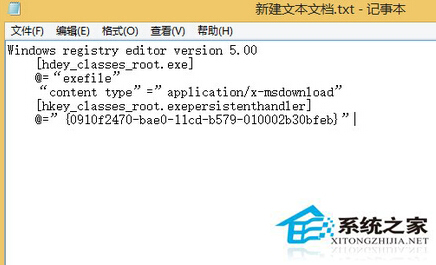
此註冊表修正了 `.exe` 檔案關聯的預設值與持久處理器 CLSID,恢復了系統執行管理主控台 (MMC) 所需的核心關聯。若問題持續,可嘗試以系統管理員身分執行 `sfc /scannow` 修復系統檔案。