許多用戶忽略系統內建功能,實際很好用:
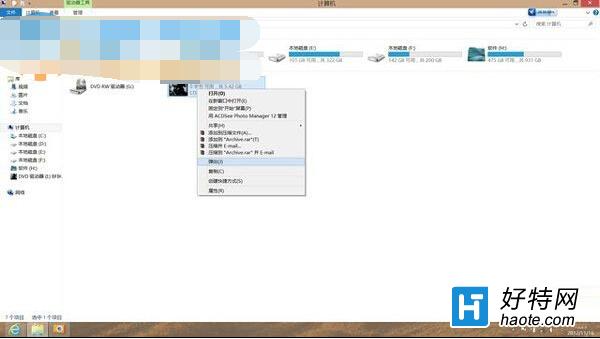
Win8 掛載 ISO 只需「雙擊映像檔」,無需 Daemon Tools 等第三方軟體。
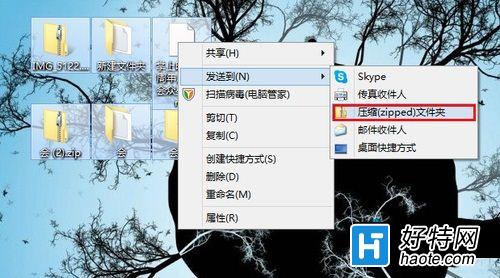
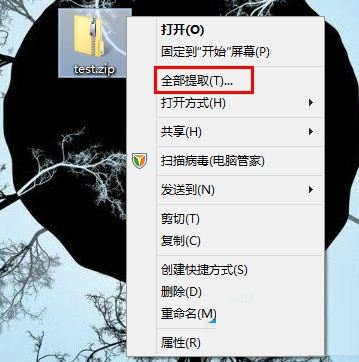
右鍵檔案→「傳送到」→「壓縮 (zipped) 資料夾」建立 ZIP。解壓縮:右鍵壓縮包→「全部解壓縮」→選路徑→「解壓縮」。
系統內建功能常被忽略卻很實用,建議多發掘活用。
Win8 開機藍畫面 0x0000008E 怎麼解決?移除 KB2839229 更新與硬體排查
Windows 8.1 升級 Windows 8.1 Update RTM 完整實戰教學(含前置補丁檢查、安裝順序、新功能圖解)
Windows 8 內建 Office 嗎?區分 Windows 8、Windows RT 與 Office 版本差異
Windows 8 IE10 設定在新索引標籤開啟視窗與連結
Win8.1 開啟工作管理器三大法
Win8 筆電玩網遊超級卡?檢查規格、更新獨顯驅動、關閉核顯兩大關鍵
Win 8.1 透過登錄檔還原所有資料夾預設檢視設定
Win8.1 隱藏操作技巧三則:關閉 Modern 應用、關閉自動更新、快速找到新安裝應用