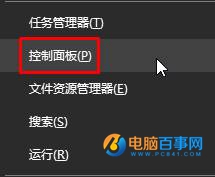
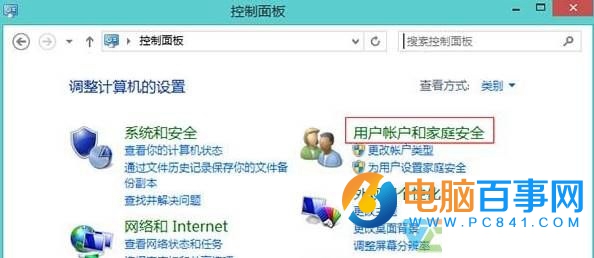
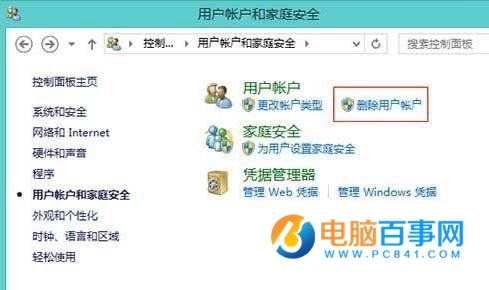
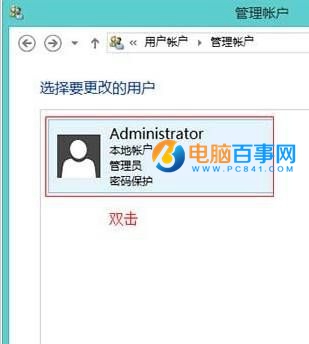
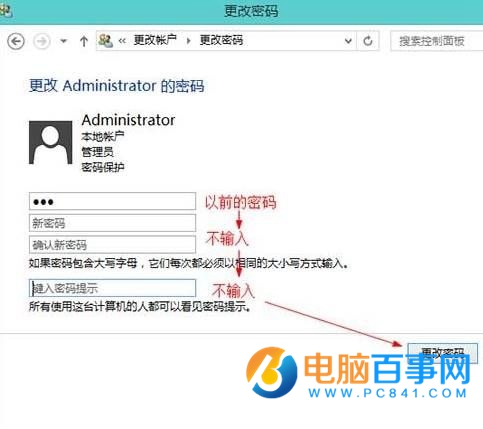
Win8 設定管理員密碼後覺得每次開機輸入麻煩?若電腦無機密資料,可透過控制台移除密碼,實現免密碼直接進桌面。步驟如下:
重開機後即無需輸入密碼直接進入桌面。提醒: 移除密碼降低安全性,公共場合/攜帶筆電建議保留密碼或改用 PIN/圖片密碼。
Win8 Metro 開始畫面磚塊行數自訂教學:從設定到登錄檔進階調整
Windows 8 系統設定自動登入,免輸入密碼開機教學
Win 8 應用商店收不到更新提醒?解決方法
Windows 8 切換應用程式完全指南:快速鍵與滑鼠手勢雙管齊下
同方新款超極本曝光:全球首款 Win8 十點觸控鋁合金一體成型
Windows 8.1 無法睡眠/喚醒失敗解決方案:顯示卡驅動更新與登錄表 AwayModeEnabled 移除
Windows 8 安全性檢查清單:七大內建防護一次啟用
Windows 8 安裝完成發現是英文版?控制台語言設定安裝中文語言包解決