Windows XP Windows 7 Windows 2003 Windows Vista Windows 綜合教學 Linux 系統教學
Windows 10 Windows 8 Windows 2008 Windows NT Windows Server 電腦軟體教學

KMSpico 啟用 Windows 8.1 完整圖文教學:傻瓜式一鍵啟用流程

編輯:Windows 8 系統介紹

工具準備

下載 KMSpico 安裝包(如 KMSpico_Install_v8.7),解壓縮。

安裝啟用步驟

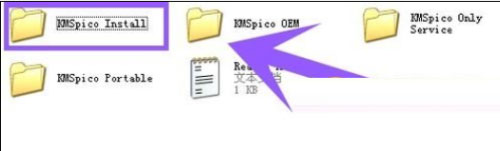
  1. 進入解壓縮資料夾 KMSpico Install。
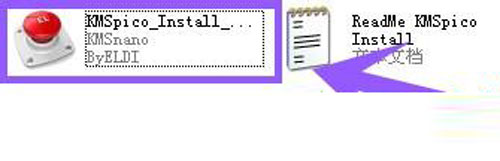
  2. 右鍵 KMSpico_Install_v8.7(紅色按鈕圖示檔案)> 「以系統管理員身分執行」。
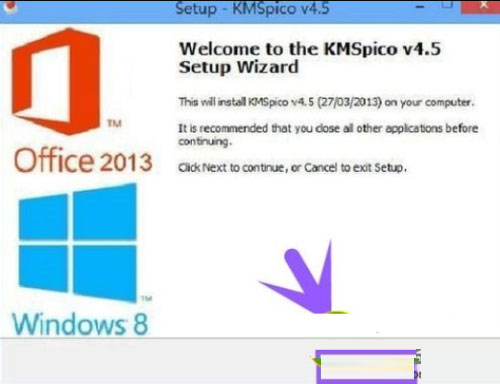
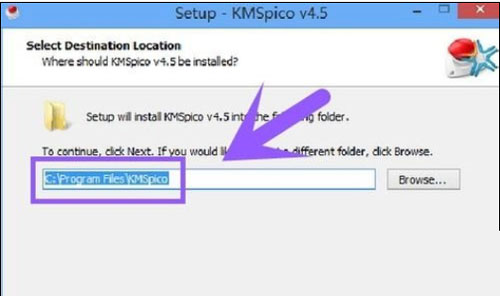
  3. 安裝嚮導全程點選「Next」(英文介面不影響操作),保持預設安裝路徑。
KMSpico 安裝資料夾
KMSpico 安裝資料夾內容
以管理員身分執行
右鍵以管理員身分執行安裝程式
安裝嚮導 Next
一路 Next 傻瓜式安裝
保持預設安裝路徑
保持預設安裝路徑

安裝完成後,KMSpico 會自動在背景啟用 Windows 8.1 及 Office(若已安裝),無需人工干預。啟用狀態可在「系統」屬性中查看。

注意:KMS 啟用屬於大量授權機制,需定期聯網重新啟用(通常 180 天),請確保裝置定期連網。請勿用於商業營利環境,建議購買正版授權。

Copyright © Windows教程網 All Rights Reserved