Win7 系統預設介面字體「宋體」在高解析度螢幕下筆畫鋸齒明顯、觀感不佳。透過替換系統字體檔 simsun.ttc 為 XP 版宋體 (字形圓潤、無鋸齒),配合註冊表重導向,可徹底改善系統對話框、選單、視窗標題等所有介面文字渲染效果。
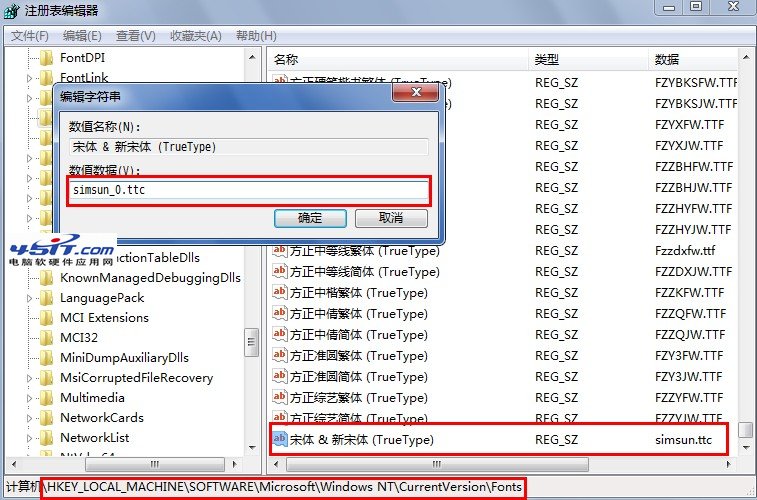
C:\Windows\Fonts\ 產生 simsun_0.ttc (新字體檔)。regedit 開啟註冊表編輯器。HKEY_LOCAL_MACHINE\SOFTWARE\Microsoft\Windows NT\CurrentVersion\Fontssimsun.ttc 改為 simsun_0.ttc: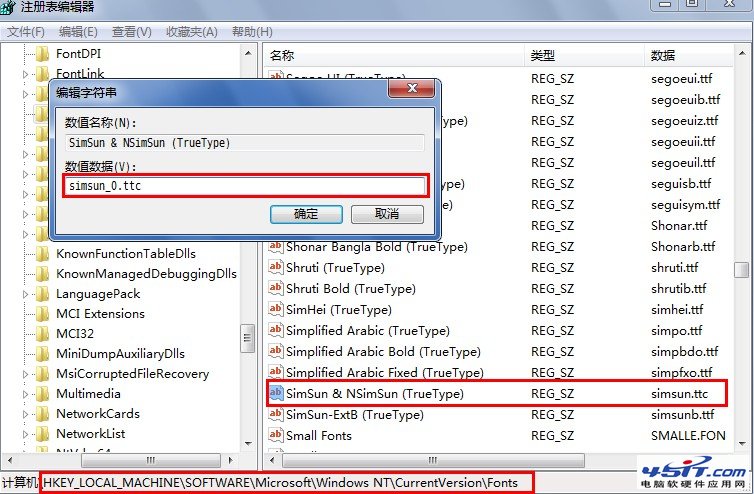
若嫌 simsun_0.ttc 檔名不習慣,可將其完全取代原 simsun.ttc:
cd /d C:\Windows\Fontstakeown /f simsun.ttcicacls simsun.ttc /grant everyone:fmove simsun_0.ttc simsun.ttcsimsun.ttc 或保持不變。