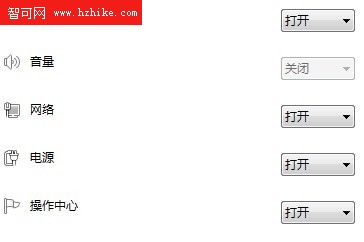
右下角音量圖示變灰、無法點擊調整,但聲音正常播放。原因通常是 systray.exe 異常,重啟即可修復。
systray.exe
explorer.exe
C:\Windows\System32\systray.exe
若重開機後問題復發,屬於 Windows 7 SP0 已知 Bug,建議升級至 SP1 或重裝修正版系統。
Mac 安裝 Windows 7 驅動全攻略:Boot Camp 助理與安裝光碟一次搞定
Win7 群組原則隱藏系統磁碟:防止誤刪 C 槽、資料外洩,家有熊孩子必學
Win 7 傳真功能消失?「開啟或關閉 Windows 功能」重裝即可恢復
Windows 下實作第 7 層軟負載經驗分享(4)
Win7 內建「數學輸入面板」:手寫識別數學公式,直接插入 Word 輕鬆搞定
Win7 亂碼問題三步驟徹底解決:控制台、註冊表字集、Locale
恢復 Windows 7 + XP 雙開機選單完整圖文教學
Windows 快速啟動程式的執行命令大全(上)