Windows XP Windows 7 Windows 2003 Windows Vista Windows 綜合教學 Linux 系統教學
Windows 10 Windows 8 Windows 2008 Windows NT Windows Server 電腦軟體教學

Win7 32位桌面圖示無法自動重新整理?登錄新增 UpdateMode 修復

編輯:Win7 常見問題解答

桌面新增/刪除/重命名檔案後,圖示不即時更新,需手動按 F5 重新整理?這是登錄缺少 UpdateMode 設定導致殼層不自動偵測檔案系統變更。新增對應登錄值即可修復。

登錄修復步驟

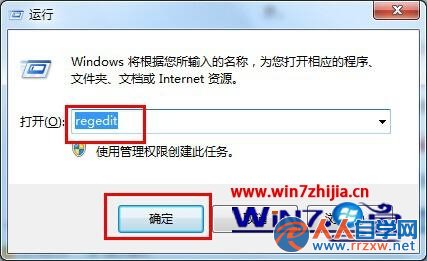
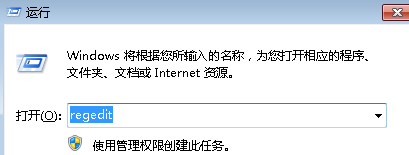
  1. Win + R → regedit 開啟登錄編輯器。
    登錄編輯器開啟
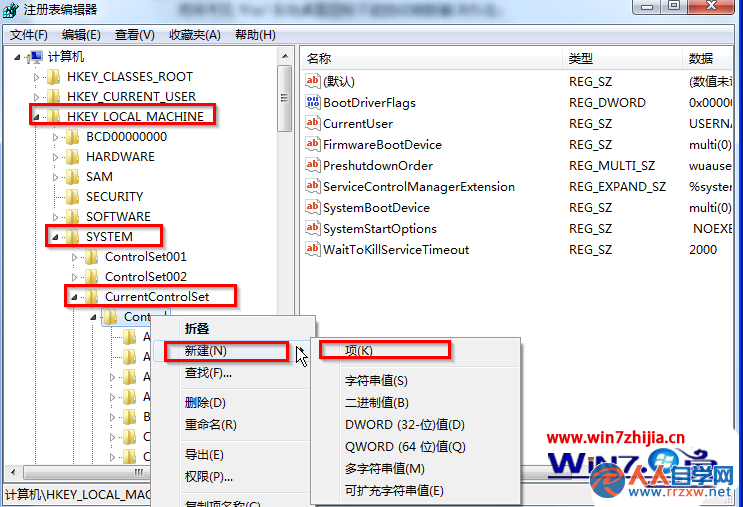
  2. 瀏覽至:
    HKEY_LOCAL_MACHINE \ SYSTEM \ CurrentControlSet \ Control
  3. 右鍵 Control → 新增 → 項 → 命名 Update。
    新增 Update 項
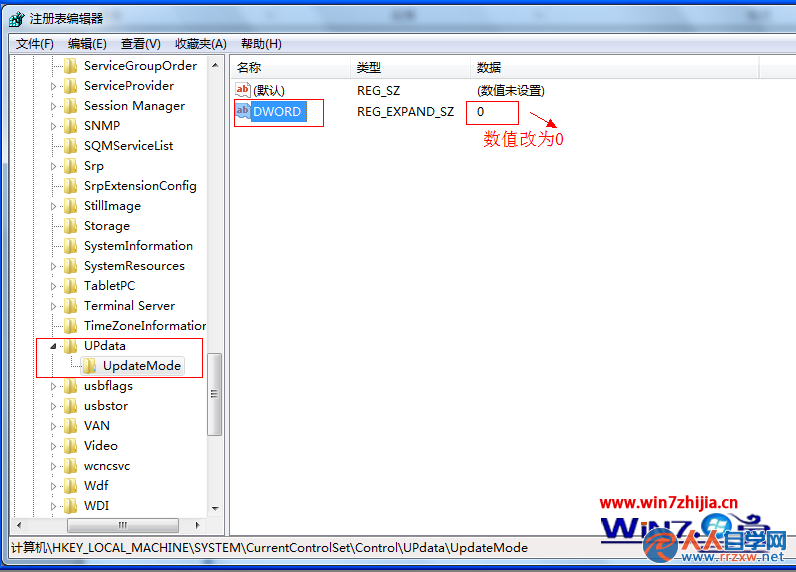
  4. 右鍵 Update → 新增 → 項 → 命名 UpdateMode。
  5. 右鍵 UpdateMode 右側空白處 → 新增 → 可擴充字串值 → 命名 DWORD → 雙擊將數值資料設為 0。
    設定 DWORD 數值為 0
  6. 重新開機或重新啟動 explorer.exe 生效。

注意: 若 DWORD 已存在,請先刪除再重建。此修復適用於 Win7/Win8/Win8.1,Win10 罕見此問題。

Copyright © Windows教程網 All Rights Reserved