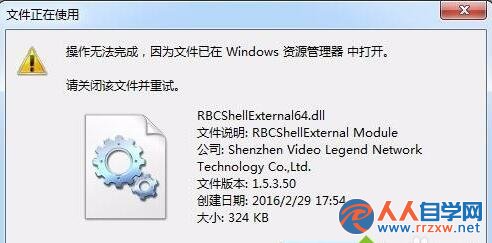
卸載迅雷影音後,仍定時彈出「影音資訊」廣告視窗,任務管理器見 `KKTIP.exe` 進程。殘留檔案位於 `C:\Users\Public\Video Legend\`,且 `RBCShellExternal64.dll` 被 `explorer.exe` 鎖定無法刪除。
徹底清除步驟
- **結束進程**:任務管理器 → 詳細資料 → 找 `KKTIP.exe` / `RBCShellExternal64.dll` 相關 → 結束工作。
- **結束 explorer.exe**:任務管理器 → 找 `Windows Explorer` / `explorer.exe` → 右鍵「結束工作」(桌面/工作列消失正常)。
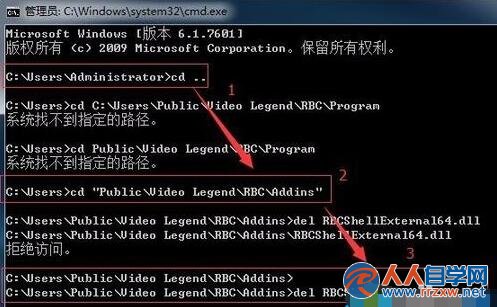
- **管理員 CMD 刪除鎖定 DLL**:
cd /d C:\Users\Public\Video Legend\RBC\Addins
del RBCShellExternal64.dll
- **重啟 explorer.exe**:任務管理器 → 檔案 → 執行新工作 → 輸入 `explorer.exe` → 確定。
- **刪除整個資料夾**:`C:\Users\Public\Video Legend\` 現在可正常刪除。
替代簡易法
- 用 **Geek Uninstaller / Revo Uninstaller / IObit Uninstaller** 選「強力掃描殘留」卸載迅雷影音,通常能一併清除 `Video Legend` 資料夾與註冊表項。
- 或進 **安全模式** 直接刪除資料夾(安全模式不載入 `RBCShellExternal64.dll`)。
教訓
- 國產視訊軟體常捆綁廣告模組、駐留殘留檔案,**建議改用 PotPlayer / VLC / MPC-BE / IINA** 等純淨播放器,無廣告、無殘留、解碼更強。