錯誤現象
建立 PPPoE 寬帶連線撥號時,彈出錯誤代碼 1717,提示「遠端存取服務無法啟動」或類似訊息,無法撥號上網。
根因
Windows 事件記錄服務 (Windows Event Log) 被停用或設為手動未啟動。RAS (遠端存取服務) 依賴 Event Log 記錄撥號過程事件,缺少此服務導致撥號流程中斷回報 1717 錯誤。
解決步驟
- 按 Win + R 輸入
services.msc 開啟服務管理員。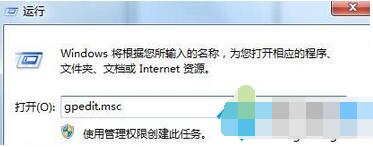
- 找到 Windows Event Log,雙擊開啟屬性。
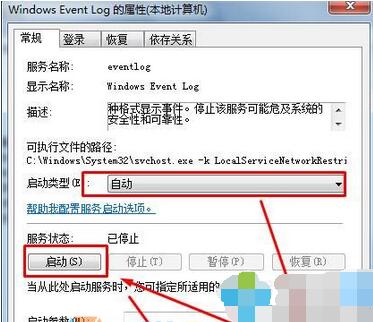
- 將「啟動類型」改為 自動。
點擊「套用」 → 點擊「啟動」 (若服務已停止) → 「確定」。
- 重新嘗試寬帶撥號,錯誤 1717 應消失,正常連線。
補充排查
- 若服務啟動後仍報錯,檢查相依服務:
Remote Procedure Call (RPC)、DCOM Server Process Launcher、Windows Event Log 必須均為「自動」且「執行中」。
- 系統檔案損壞:管理員 CMD 執行 `sfc /scannow` 修復。
- 若大量服務異常,建議系統還原或重裝,因可能遭遇惡意軟體破壞或優化軟體誤關核心服務。