Windows XP Windows 7 Windows 2003 Windows Vista Windows 綜合教學 Linux 系統教學
Windows 10 Windows 8 Windows 2008 Windows NT Windows Server 電腦軟體教學

Win7 桌面圖示位置調整後自動還原?重啟 explorer.exe 修復快取異常

編輯:Win7 系統應用技巧

Win7 桌面圖示拖曳排列後,重開機或重新整理卻自動跳回原位,主因是 explorer.exe 桌面快取 (IconCache) 損壞或權限問題。重啟 Explorer 進程可快速修復。

快速修復:任務管理器重啟 explorer.exe

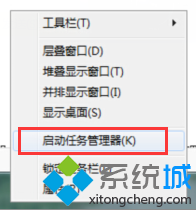
  1. 右鍵工作列空白處 →「啟動工作管理員」 (或 Ctrl+Shift+Esc)。
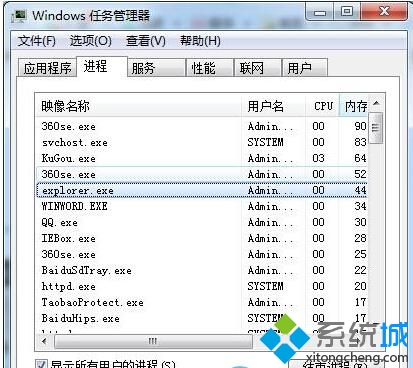
  2. 「進程」頁籤找到 explorer.exe (可能有多個) → 全部右鍵「結束進程」。
  3. 螢幕變黑 (工作列/桌面消失) 為正常現象。
  4. 工作管理器選單列:「檔案」→「執行新工作」 → 輸入 explorer.exe → 確定。
  5. 桌面/工作列恢復,嘗試移動圖示並重新整理 (F5) 驗證是否固定。

根治方案:重建圖示快取

若重啟 Explorer 無效,執行批次檔 (.bat) 徹底清除快取:

@echo off
taskkill /f /im explorer.exe
cd /d %userprofile%\AppData\Local
del IconCache.db /a
for /r %%i in (IconCache_*.db) do del "%%i" /a /f /q
start explorer.exe

以管理員身分執行,完成後桌面圖示會短暫變白再恢復,位置記憶功能修復。

進階檢查:桌面資料夾權限

  1. 右鍵桌面 →「內容」→「安全性」→ 確認目前使用者擁有「完全控制」權限。
  2. 若權限正確但仍失效,檢查註冊表 HKCU\Software\Microsoft\Windows\Shell\Bags、BagMRU 是否損壞,可匯出備份後刪除這兩個鍵值重開機重建。

多數情況「重啟 explorer.exe」即時生效,屬最輕量級修復。

Copyright © Windows教程網 All Rights Reserved