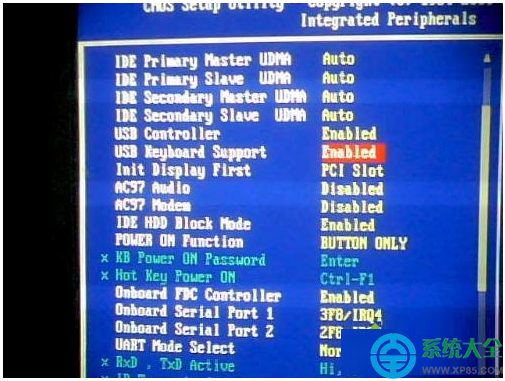
Win7 系統電腦開機狂按 Delete/F2 無法進入 BIOS 設定畫面,常見於使用 USB 鍵盤但 BIOS 中「USB Keyboard Support」/「USB Legacy Support」未啟用,導致開機階段(POST)無法識別 USB 鍵盤輸入。啟用該選項即可解決。
操作步驟(若能以其他方式進入 BIOS)
- 嘗試以 PS/2 鍵盤(圓口紫色介面)連接主機板,開機進入 BIOS。
- 或使用主機板支援的「BIOS Flashback」/「USB BIOS Flashback」功能(無需進入 BIOS 即可更新 BIOS,部分高階主機板支援)。
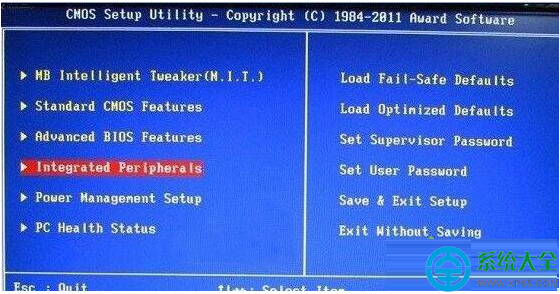
- 進入 BIOS 後,尋找:Integrated Peripherals / Peripherals / Advanced → USB Configuration。
- 找到 USB Keyboard Support / USB Legacy Support / USB Legacy Function → 設為 Enabled。
- F10 儲存離開,重開機後 USB 鍵盤即可在開機階段操作 BIOS。
若完全無法進入 BIOS(無 PS/2 埠、無 Flashback)
- 清除 CMOS:斷電 → 取下主機板鈕扣電池 (CR2032) 等待 1 分鐘 → 裝回 → 重開機,BIOS 恢復預設值(通常預設啟用 USB Legacy)。
- 主機板跳線清除 CMOS:參考主機板手冊找到
CLR_CMOS / JCMOS 跳線,短接 5-10 秒清除。
- 借用 PS/2 鍵盤:最直接有效的臨時方案。
BIOS 版本差異提醒
- Award BIOS:通常在 Integrated Peripherals 中。
- AMI BIOS:通常在 Advanced → USB Configuration 中。
- UEFI BIOS:通常在 Advanced → USB Configuration → Legacy USB Support。
- 品牌機(Dell/HP/Lenovo)BIOS 選項可能精簡,尋找「USB Boot Support」或「External USB Port」相關選項。
延伸:開機熱鍵速查
| 品牌/類型 | 進入 BIOS 鍵 | 開機選單鍵 |
|---|
| 自組主機板 (ASUS/MSI/Gigabyte/ASRock) | Del / F2 | F8 / F11 / F12 |
| Dell | F2 | F12 |
| HP | F10 / Esc | F9 / Esc |
| Lenovo | F1 / F2 / Fn+F2 | F12 / Fn+F12 |
| Acer | F2 / Del | F12 |