Windows XP Windows 7 Windows 2003 Windows Vista Windows 綜合教學 Linux 系統教學
Windows 10 Windows 8 Windows 2008 Windows NT Windows Server 電腦軟體教學

Win7 開啟登錄編輯器 (regedit) 三大絕招:執行指令、系統路徑直達、開始搜尋

編輯:Win7 系統應用技巧

登錄編輯器是進階操作核心工具,Win7 提供三種快速開啟方式,適應不同操作習慣。本文整理三大絕招,建議收藏備查。

方法一:執行指令 (最經典、鍵盤黨首選)

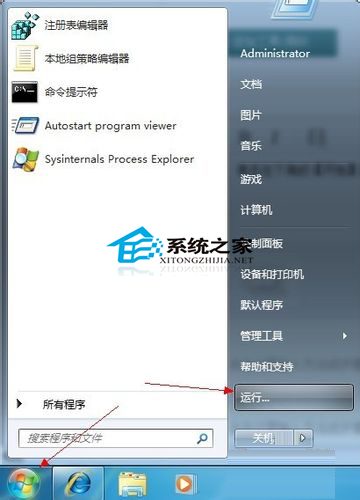
  1. Win + R 開啟「執行」。
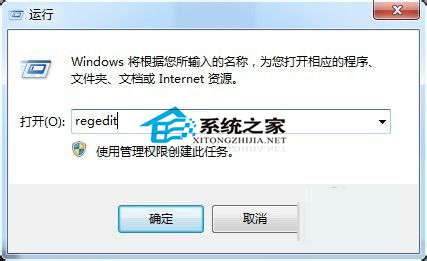
  2. 輸入 regedit → Enter。

執行視窗輸入 regedit
確定開啟

方法二:系統路徑直達 (無法使用執行時的備案)

  1. 開啟「電腦」→ 系統盤 (C:) → Windows → System32。
  2. 找到 regedit.exe (或 regedt32.exe,兩者相同) → 雙擊開啟。
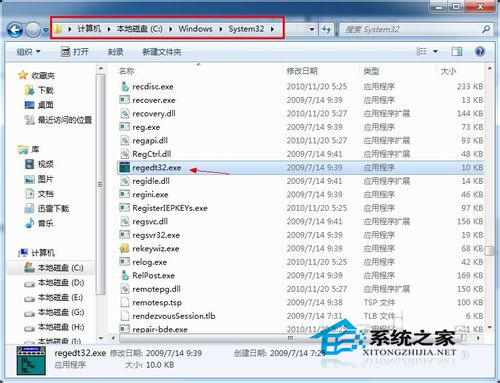
System32 目錄下 regedit.exe

方法三:開始選單搜尋 (現代操作、模糊匹配)

  1. 點擊「開始」或按 Win 鍵。
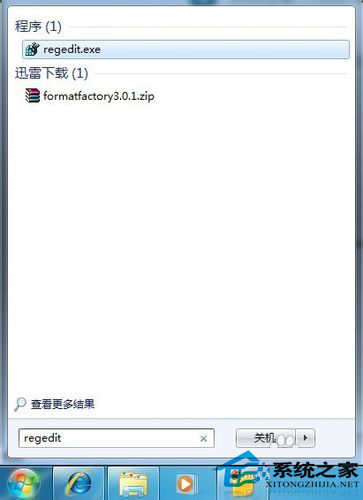
  2. 搜尋框輸入 regedit → Enter。

開始搜尋 regedit

進階技巧

  • 建立桌面捷徑:右鍵 regedit.exe → 「傳送到」→「桌面捷徑」,或拖曳建立捷徑。
  • 釘選到工作列/開始選單:右鍵捷徑/搜尋結果 → 「釘選到工作列」/「釘選到開始選單」。
  • 以系統管理員身分執行:右鍵 → 「以系統管理員身分執行」 (修改機器層級機碼 HKLM 需要)。

補充說明

  • regedit.exe 舊版介面、regedt32.exe NT 版介面,Win7 兩者皆指向同一程式。
  • 若 regedit 被群組原則/登錄值鎖定 (參考 ID 39060),以上三法均無效,需先解鎖。

Copyright © Windows教程網 All Rights Reserved