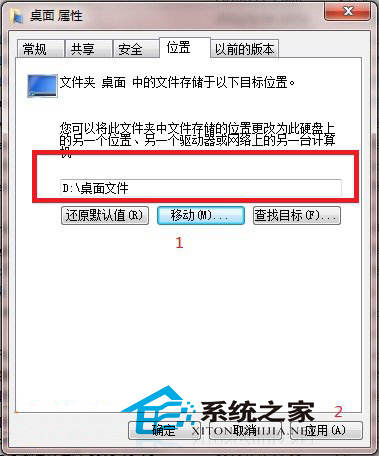
桌面資料夾實際位於 C 槽 C:\Users\使用者名稱\Desktop,系統重灌時桌面檔案極易遺失。將桌面資料夾移至 D 槽可保護資料安全。
C:\Users\使用者名稱\Desktop
C:\Users\您的使用者名稱
D:\Desktop
未來存放桌面的檔案將自動寫入 D 槽,系統崩潰重灌時資料得以保留。若要還原,同樣在「位置」頁籤點擊「還原預設值」。
開機卡在「歡迎」介面久、進桌面黑屏、無網路、遊戲跑不起?硬碟/記憶體/系統三大嫌疑
Win7 IE 瀏覽器左下角顯示「網頁上有錯誤」完整修復教學
桌上型電腦 Win7 手動安裝 USB 無線網卡驅動程式教學
這台電腦能裝 Win7 嗎?驅動支援是關鍵
Win7 系統利用透明圖標隱藏資料夾的完整教學
Win7 開啟檔案與印表機共用:控制台→網路共用中心完整圖文教學
Win7 系統安裝字體完整指南:雙重方法、快捷方式安裝與常見問題解決
Win7 繪圖板連點出現水波紋干擾的群組原則關閉筆回饋解決法