Windows XP Windows 7 Windows 2003 Windows Vista Windows 綜合教學 Linux 系統教學
Windows 10 Windows 8 Windows 2008 Windows NT Windows Server 電腦軟體教學

Win7 系統檔案損壞怎麼修?SFC /scannow 一鍵掃描修復,日誌精準定位無法修復項目

編輯:Win7 系統應用技巧

系統檔案遺失/損壞導致藍屏、功能異常,Windows 自帶 SFC (System File Checker) 能自動比對備份庫修復。

標準修復流程

  1. 開始搜尋 cmd → 右鍵「以管理員身分執行」。
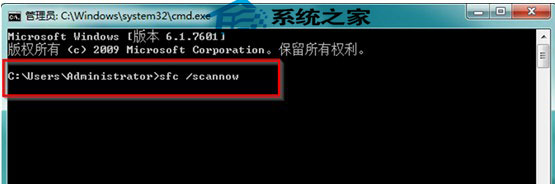
  2. 輸入 sfc /scannow 按 Enter,靜待掃描修復完成(約幾分鐘)。
    SFC 掃描中

查看無法修復的檔案清單

  1. 同樣以管理員開啟 CMD。
  2. 執行:
    findstr /c:"[SR]" %windir%\Logs\CBS\CBS.log > "%userprofile%\Desktop\sfcdetails.txt"
  3. 桌面打開 sfcdetails.txt,即可看到具體哪些檔案無法修復(如 accessibility.dll 遺失)。

SFC 修復成功率極高,免去了系統還原的不穩定風險。操作雖顯專業,實際只有兩條指令,新手也能輕鬆上手。

Copyright © Windows教程網 All Rights Reserved