Windows XP Windows 7 Windows 2003 Windows Vista Windows 綜合教學 Linux 系統教學
Windows 10 Windows 8 Windows 2008 Windows NT Windows Server 電腦軟體教學

Win7 純淨版 TXT 文字檔無法開啟?修正關聯至 Notepad 或複製 notepad.exe 修復

編輯:Win7 系統應用技巧

Win7 純淨版雙擊 .txt 無反應/錯誤?通常是檔案關聯遺失或 notepad.exe 損毀。修正關聯或從正常系統複製 notepad.exe 即可修復。

方法一:修正檔案關聯(最常見)

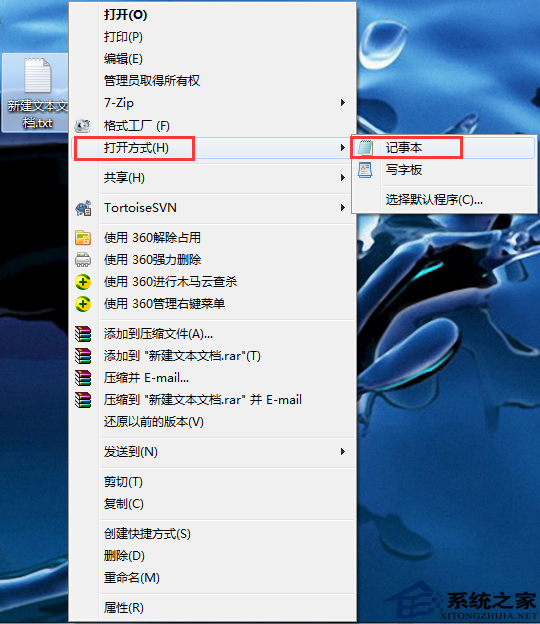
  1. .txt 檔右鍵 → 「開啟方式」 → 「選擇預設程式」
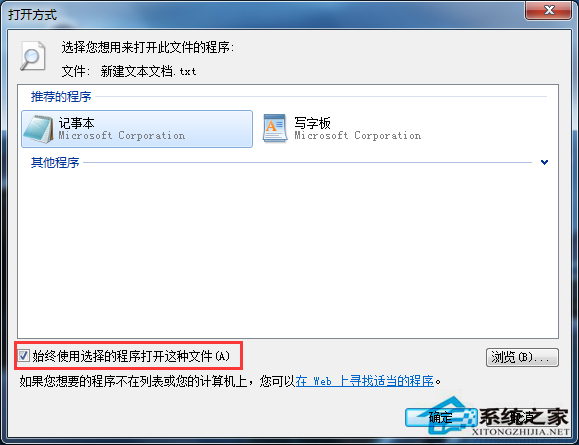
  2. 選 記事本 → 勾選「永遠使用選取的程式開啟這類檔案」 → 確定
  3. 若列表無記事本 → 「瀏覽」 → C:\Windows\System32\notepad.exe

方法二:修復/替換 notepad.exe(關聯正確但仍失效)

  1. 檢查 C:\Windows\System32\notepad.exe 是否存在
  2. 缺損/損毀:從同版本 Win7 複製 notepad.exe 覆蓋(需 TrustedInstaller 權限)
  3. 或執行 sfc /scannow 修復系統檔案

txt右鍵開啟方式選擇預設程式

選擇記事本勾選永遠使用

進階:註冊表檢查 HKCR\.txt → HKCR\txtfile\shell\open\command 值應為 %SystemRoot%\system32\NOTEPAD.EXE %1。

Copyright © Windows教程網 All Rights Reserved