Windows XP Windows 7 Windows 2003 Windows Vista Windows 綜合教學 Linux 系統教學
Windows 10 Windows 8 Windows 2008 Windows NT Windows Server 電腦軟體教學

Win7 開機提示 msvcp71.dll 遺失的補檔與註冊修復法

編輯:Win7 系統應用技巧

開機彈出 msvcp71.dll 遺失,此為 Microsoft Visual C++ 2003 執行階段庫檔案。從同版本正常電腦複製或下載該檔,放入正確系統目錄並註冊即可修復。
msvcp71.dll 遺失錯誤

複製目標路徑 (依系統版本)

  • Windows NT/2000:C:\WINNT\System32\
  • Windows XP/Vista/7/8 (x86 32位元):C:\Windows\System32\
  • Windows 7/8 x64 (64位元):C:\Windows\SysWOW64\

修復步驟

  1. 將 msvcp71.dll 複製至上述對應目錄。
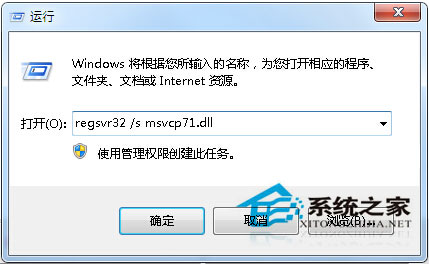
  2. 按 Win + R 輸入 regsvr32 /s msvcp71.dll 並按 Enter 註冊。
  3. 執行 regsvr32 註冊
  4. 重開機驗證錯誤是否消失。

提醒:C 槽系統檔案勿隨意刪除,軟體更新會自動替換,誤刪導致此類遺失錯誤。

Copyright © Windows教程網 All Rights Reserved