Windows XP Windows 7 Windows 2003 Windows Vista Windows 綜合教學 Linux 系統教學
Windows 10 Windows 8 Windows 2008 Windows NT Windows Server 電腦軟體教學

Win7 .exe 執行檔關聯損壞?登錄檔修復 exefile\shell\open\command 預設值

編輯:Win7 系統應用技巧

所有 .exe 檔雙擊無法執行、或以記事本/其他程式開啟,代表 exefile\shell\open\command 登錄鍵值被竄改。修復預設值 "%1" %* 即可恢復所有程式正常執行。

修復步驟

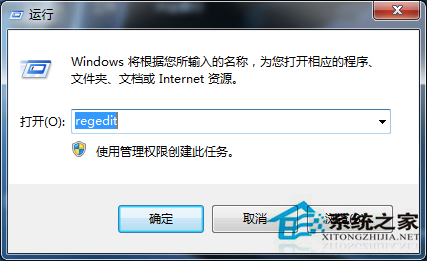
  1. Win + R 輸入 regedit (若 cmd 可用也可用指令修復)。
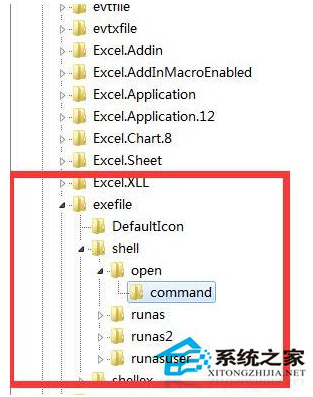
  2. 定位:HKEY_CLASSES_ROOT\exefile\shell\open\command。
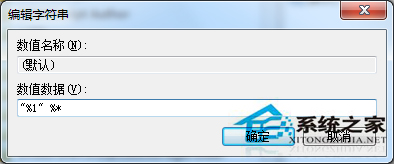
  3. 右側「預設」值雙擊,修改數值資料為:
    "%1" %*
  4. 按確定,重新開機生效,所有 .exe 檔恢復正常執行。

開啟登錄編輯器
定位 exefile command
修復預設值

若 regedit 也無法執行:用 Win+R 輸入 cmd,執行指令:
reg add HKCR\exefile\shell\open\command /ve /d "\"%1\" %*" /f
重開機即可修復。

Copyright © Windows教程網 All Rights Reserved