Windows 7 工作列縮圖預覽預設有延遲,滑鼠停留需等待才顯示視窗內容。透過修改登錄檔 MouseHoverTime 與 DesktopLivePreviewHoverTime,可大幅縮短甚至消除延遲,提升操作流暢度。
Windows Registry Editor Version 5.00

[HKEY_CURRENT_USER\Control Panel\Mouse]
"MouseHoverTime"="100"

[HKEY_LOCAL_MACHINE\SYSTEM\CurrentControlSet\Control\SecurePipeServers\winreg]
"RemoteRegAccess"=dword:00000001

[HKEY_CURRENT_USER\Software\Microsoft\Windows\CurrentVersion\Explorer\Advanced]
"DesktopLivePreviewHoverTime"=dword:000000f4
ReduceHoverDelay.reg(副檔名為 .reg)。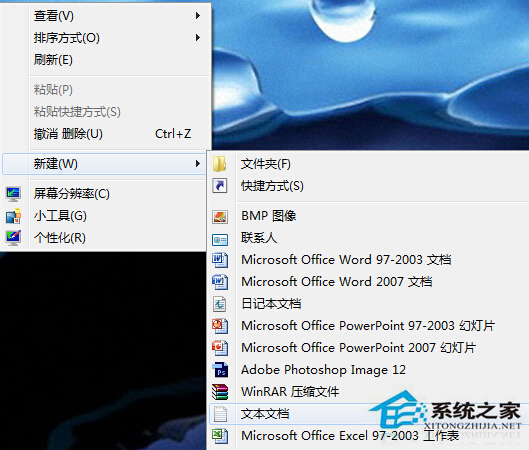
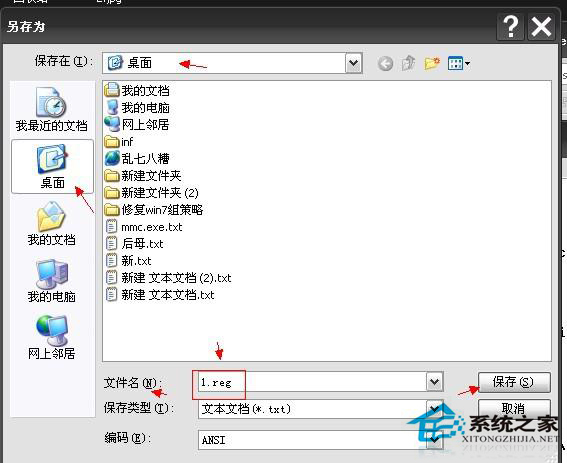
修改後,工作列縮圖預覽將幾乎瞬間顯示,大幅改善多視窗切換體驗。數值可依個人習慣微調(單位為毫秒)。