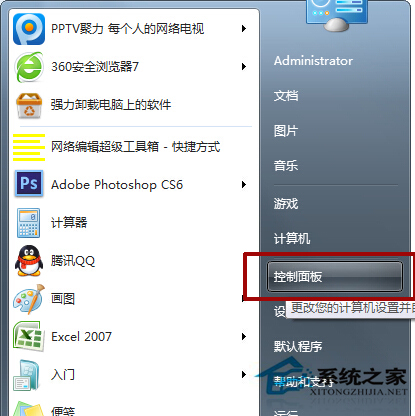
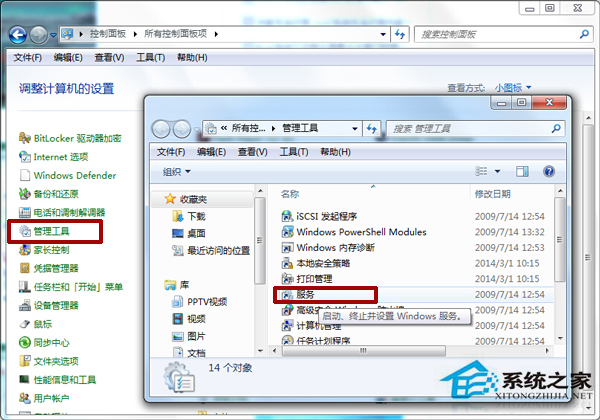
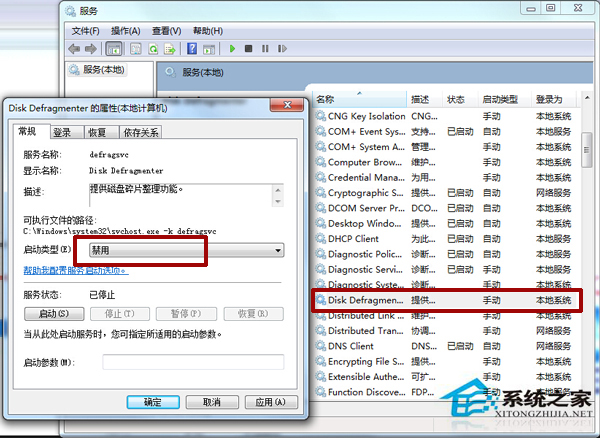
Windows 7 內建的磁碟重組工具會定期自動執行,若您習慣使用第三方優化軟體(如 Defraggler、PerfectDisk),或使用固態硬碟(SSD)不需重組,禁用此服務可減少背景資源佔用。
提醒:機械硬碟(HDD)若無其他重組工具,建議保留此服務或手動定期重組,以維持讀寫效能。SSD 則完全不需重組,必須禁用。
Win7 內建鬧鐘功能設定教學:任務排程器建立定時播放音樂喚醒電腦
Win7 開始選單不見控制台選項?自訂開始選單找回教學
Win7 註冊表 Shell 鍵值誤刪導致文件無法打開?有備份還原,無備份重裝
Win7打開註冊表編輯器的兩種標準方法
Win7 升級 64 位元後 Excel 2003 打不開?五大解法:版本不相容升級 Excel、掃毒、忽略 DDE、開啟並修復、EasyRecovery 修復檔案
開機跑磁碟檢查怎麼辦?磁碟自檢卡住、失敗完整解決方案
Win7 硬盤安裝器一鍵重裝系統圖文教程:無需光盤/U盤,硬盤直裝最省心
Win7 瀏覽器兼容模式設定完整教學:解決網頁顯示異常問題