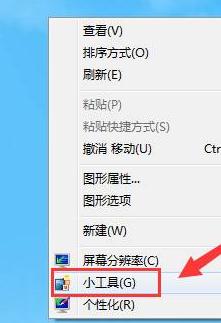
Windows 7 內建「小工具」平台,提供行事曆、時鐘、天氣、CPU 計量表等桌面小工具。將行事曆加到桌面,方便隨時查看日期、農曆、節氣。
補充:小工具平台在 Windows 8/10 已移除,Win7 官方小工具庫也已下線。若需更多小工具,可搜尋第三方工具(如 8GadgetPack)恢復功能,但需注意安全性。
Win7 開啟網頁非最大化視窗?兩招設定讓 IE 永記最大化狀態
長時間使用電腦身體不適?人體工學、視力保護與生活平衡建議
Windows 7 印表機卡紙原因分析與正確取出步驟圖解
Win7 螢幕亮度調整全攻略:螢幕實體鍵、Intel/獨顯控制台、控制台「顯示」設定、桌面右鍵解析度進階
電腦頻繁自動重啟/關機?十大核心原因與針對性解決方案
Windows 7 筆電 3G 網卡分享熱點:建立臨時網路 + ICS 網際網路連線共享
Windows 7 桌面字型顏色如何更改?視窗色彩進階設定
Win7 任務欄圖示取消合併,找回 XP 風格顯示模式