IE SmartScreen 篩選器會即時檢查網站信譽、下載檔案安全性,雖增強安全但可能拖慢瀏覽速度。若追求極致速度且自信辨識釣魚網站,可透過群組原則停用。
gpedit.msc。使用者設定 → 系統管理範本 → Windows 元件 → Internet Explorer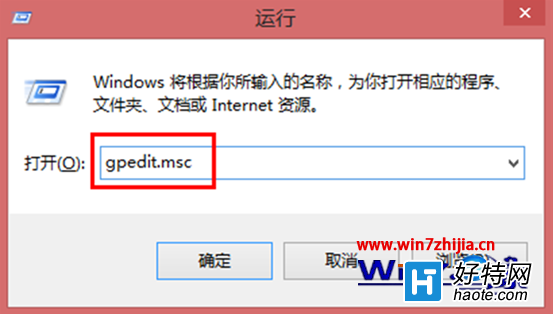
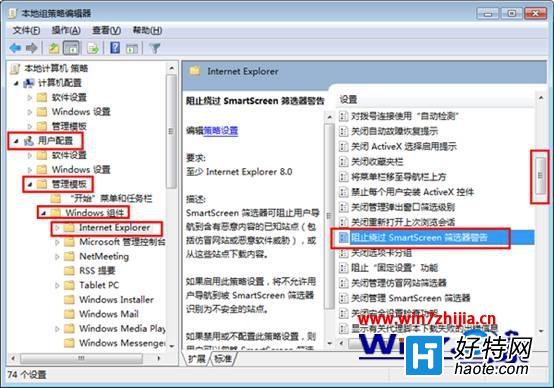
風險提醒:停用 SmartScreen 將失去即時惡意網站/下載攔截保護,建議僅在受控環境或搭配其他安全軟體時使用。一般用戶不建議關閉。
Win7 無法開啟 .DMP 記憶體傾印檔?安裝 Debugging Tools 使用 WinDbg 分析
Win7 旗艦版卸載軟體後重開機黑屏?msconfig 清理啟動項與服務解決
Win7 安裝 Office 2007 報錯 1713?以管理員身分執行 Setup.exe 而非 MSI 直接安裝
惠普 JK550 筆記本換 SSD 避坑指南:容量、協議、品牌、安裝全流程
Win7 C槽 ProgramData 資料夾能刪除嗎?絕對不能!正確處理方式看這裡
Win7 工作列圖示如何置中顯示?新增工具列 + 資料夾捷徑 + 隱藏標題實現置中效果
Mac 一體機 (iMac) 安裝 Windows 7 完整圖文教學:Boot Camp 分區、驅動安裝、藍牙配對、疑難雜症