系統日誌預設儲存在 %SystemRoot%\System32\Config,可透過登錄修改 System 與 Application 日誌的 File 值指向自訂路徑,方便集中管理與備份。
1. 開啟 regedit 定位:HKEY_LOCAL_MACHINE\SYSTEM\CurrentControlSet\Services\EventLog\System
雙擊右側 File 值,將預設 %SystemRoot%\System32\Config\SysEvent.Evt 改為新路徑。
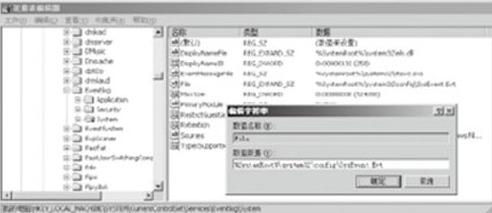
2. 同樣定位至:HKEY_LOCAL_MACHINE\SYSTEM\CurrentControlSet\Services\EventLog\Application
修改 File 值為新路徑。
重新開機生效,日誌將寫入指定位置,便於統一備份與查閱。