Windows XP Windows 7 Windows 2003 Windows Vista Windows 綜合教學 Linux 系統教學
Windows 10 Windows 8 Windows 2008 Windows NT Windows Server 電腦軟體教學

Win7 提示「找不到 flash.ocx」怎麼辦?取得權限、複製檔案、註冊 DLL 三步修復

編輯:Windows 7 系統介紹

IE10/11 彈出「找不到 flash.ocx」?Flash ActiveX 控制項檔案遺失或未正確註冊。雖不影響系統運行,但屬安全風險 (惡意網頁可利用)。修復:取得目錄權限 → 複製正確檔案 → 註冊 DLL。

修復步驟

  1. 取得兩目錄完全控制權:
    C:\Windows\System32\Macromed\Flash
    C:\Windows\SysWOW64\Macromed\Flash (64 位系統)
  2. 從正常電腦複製上述兩目錄所有檔案覆蓋過去,或下載 flash.ocx 替換。
  3. 管理員 CMD 依序註冊:
cd /d C:\Windows\System32\Macromed\Flash
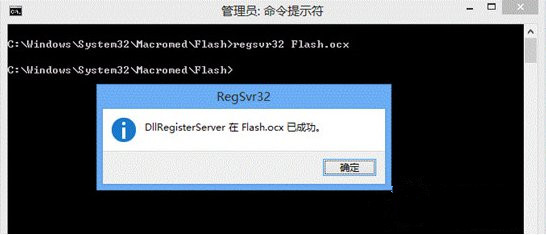
regsvr32 Flash.ocx

cd /d C:\Windows\SysWOW64\Macromed\Flash
regsvr32 Flash.ocx

  1. 重新啟動電腦 → 開啟 IE 驗證 Flash 正常播放。

Flash 目錄檔案

regsvr32 註冊成功

注意事項

  • 檔案名可能為 Flash32_版本號.ocx,註冊時用實際檔名。
  • Flash 已於 2020/12/31 終止支援,現代瀏覽器已移除支援。建議遷移至 HTML5/WebGL 技術。
  • 若必須使用舊版 IE 存取 Flash 內容,修復後請嚴格限制存取可信任網站。

三步修復 Flash.ocx,消除錯誤彈窗與潛在安全隱患。

Copyright © Windows教程網 All Rights Reserved