Windows XP Windows 7 Windows 2003 Windows Vista Windows 綜合教學 Linux 系統教學
Windows 10 Windows 8 Windows 2008 Windows NT Windows Server 電腦軟體教學

Win7 64位旗艦版滑鼠右鍵無反應、無法彈出選單?一行指令修復

編輯:Windows 7 系統介紹

現象

桌面或資源管理器中滑鼠右鍵完全無反應,無法顯示內容選單。
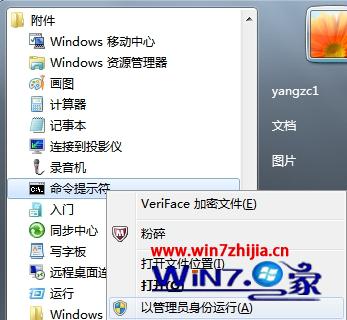
快速修復

  1. 開始 → 所有程式 → 附屬應用程式 → 「命令提示字元」右鍵 → 「以系統管理員身分執行」。
  2. 管理員命令提示字元
  3. 貼上以下指令並按 Enter:
    reg add HKEY_CURRENT_USER\Software\Microsoft\Windows\CurrentVersion\Policies\Explorer /v "NoViewContextMenu" /t REG_DWORD /d 0 /f
    taskkill /f /im explorer.exe
    start explorer.exe
    pause

原理

NoViewContextMenu=1 會強制隱藏右鍵選單,指令將其歸零並重啟 Explorer 套用。

其他可能原因

  • 第三方右鍵選單擴充套件衝突(如壓縮軟體、雲端同步工具),可用 ShellExView 停用可疑項目。
  • 系統檔損壞 → sfc /scannow 修復。
Copyright © Windows教程網 All Rights Reserved