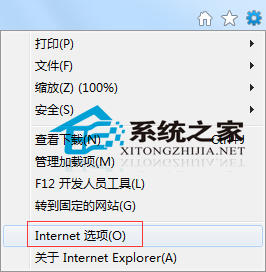
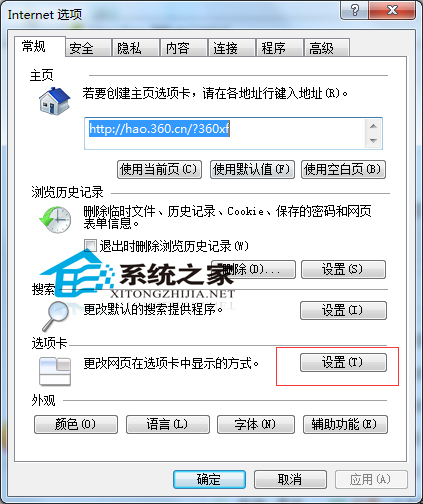
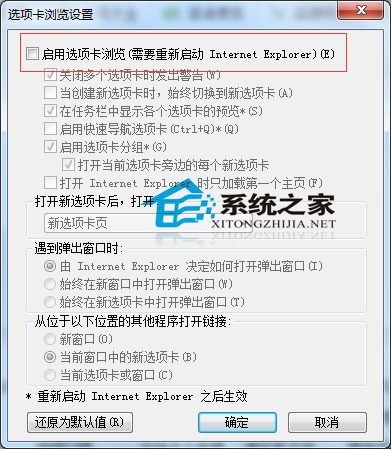
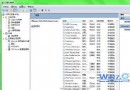
IE 預設啟用分頁瀏覽,雖方便多頁切換,但易誤關重要分頁。若習慣單視窗操作,可依下列步驟停用分頁:
若未來需恢復分頁,重複上述步驟勾回即可。
Win7 修改日期、時間與數字格式:自訂 AM/PM 顯示為上午/下午
Win 7 桌面控必看:主題、幻燈片、視窗色彩、桌面小工具 N 個愛上它的理由
Windows 7 桌面頑固圖標無法刪除?手動清除註冊表完整教學
統計數據揭露:Windows 7 平均記憶體佔用接近 XP 兩倍
IE 瀏覽器無法複製網頁文字?調整安全性設定解除腳本限制
Win7 開啟瀏覽器總跳出「寬頻連線」提示?IE 連線設定改為「永不撥號」
Win7 內建問題步驟記錄器 (PSR) 錄製故障操作:Win+R 輸入 psr 一鍵啟動錄製
Win7 關閉 Caps Lock 提示音:輕鬆存取中心關閉切換鍵聲音