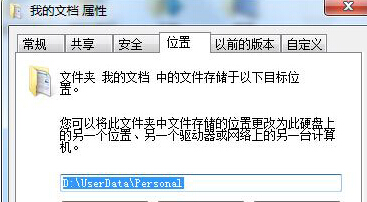
若「我的文件」被移至其他分區,想還原至系統碟預設路徑,可透過資料夾屬性「位置」索引標籤一鍵還原。
之後「我的文件」將回到 C:\Users\使用者名稱\Documents。
C:\Users\使用者名稱\Documents
Win7 工作列右鍵選單隱藏功能:按住 Shift 右鍵喚回傳統「移動/最大化/最小化/關閉」選單
Win7 更新顯卡驅動後出現花屏、解析度異常的完整排除與修復指南
Win7 登錄編輯器無法開啟?群組原則解鎖與病毒排查雙管齊下
Win7 工作列客製化完全指南:快速啟動、資源管理器、圖示大小、右鍵選單
一鍵產生 Windows 7/Vista 系統健康報告:perfmon /report 60 秒完整輸出硬軟體資訊
Wintel 新紀元:Core i5/i7 搭配 Windows 7,智能效能與能效雙贏
Win7 開機加速技巧:無 SSD 也能達 30 秒內開機
Win7 出現「Dpp Viewer Module 停止運作」錯誤解決辦法